Skip to content

crawlergo 源码学习

date
2024-03-12 21:24:30

项目介绍

项目地址:https://github.com/Qianlitp/crawlergo

crawlergo是一个使用chrome headless模式进行URL收集的浏览器爬虫。它对整个网页的关键位置与DOM渲染阶段进行HOOK,自动进行表单填充并提交,配合智能的JS事件触发,尽可能的收集网站暴露出的入口。内置URL去重模块,过滤掉了大量伪静态URL,对于大型网站仍保持较快的解析与抓取速度,最后得到高质量的请求结果集合。

crawlergo 目前支持以下特性:

  • 原生浏览器环境,协程池调度任务
  • 表单智能填充、自动化提交
  • 完整DOM事件收集,自动化触发
  • 智能URL去重,去掉大部分的重复请求
  • 全面分析收集,包括javascript文件内容、页面注释、robots.txt文件和常见路径Fuzz
  • 支持Host绑定,自动添加Referer
  • 支持请求代理,支持爬虫结果主动推送

crawlergo 是现在用的比较多的动态爬虫了,一般就是 crawlergo + xray 组合来进行漏扫,现在就来看看 crawlergo 的源码。

项目结构

├── cmd
   └── crawlergo
       ├── flag.go
       └── main.go
├── pkg
   ├── config
      ├── config.go
   ├── domain_collect.go               // 域名收集 ( 从请求列表中获取到 hostname )
   ├── engine
      ├── after_dom_tasks.go          // DOM 节点加载完成之后 表单填充|ObserverJS监听DOM|启动 AfterLoadedRun() )
      ├── after_loaded_tasks.go       // 页面加载之后 提交表单|事件触发
      ├── browser.go                  // 浏览器的初始化
      ├── collect_links.go            // 链接收集 添加到请求列表
      ├── intercept_request.go        // 请求处理 响应解析
      ├── tab.go                      // 爬虫启动...
   ├── filter
      ├── filter.go
      ├── simple_filter.go            // 简单过滤
      ├── smart_filter.go             // 智能过滤 => 打标签
      └── smart_filter_test.go
   ├── js
      └── javascript.go               // 注入的 JS
   ├── logger
      └── logger.go
   ├── model
      ├── request.go
      ├── url.go
      └── url_test.go
   ├── path_expansion.go               // robots
   ├── taskconfig.go
   ├── taskconfig_test.go
   ├── task_main.go
   └── tools
       ├── common.go
       ├── random.go
       └── requests
           ├── requests.go
           ├── response.go
           └── utils.go
├── README.md
└── README_zh-cn.md

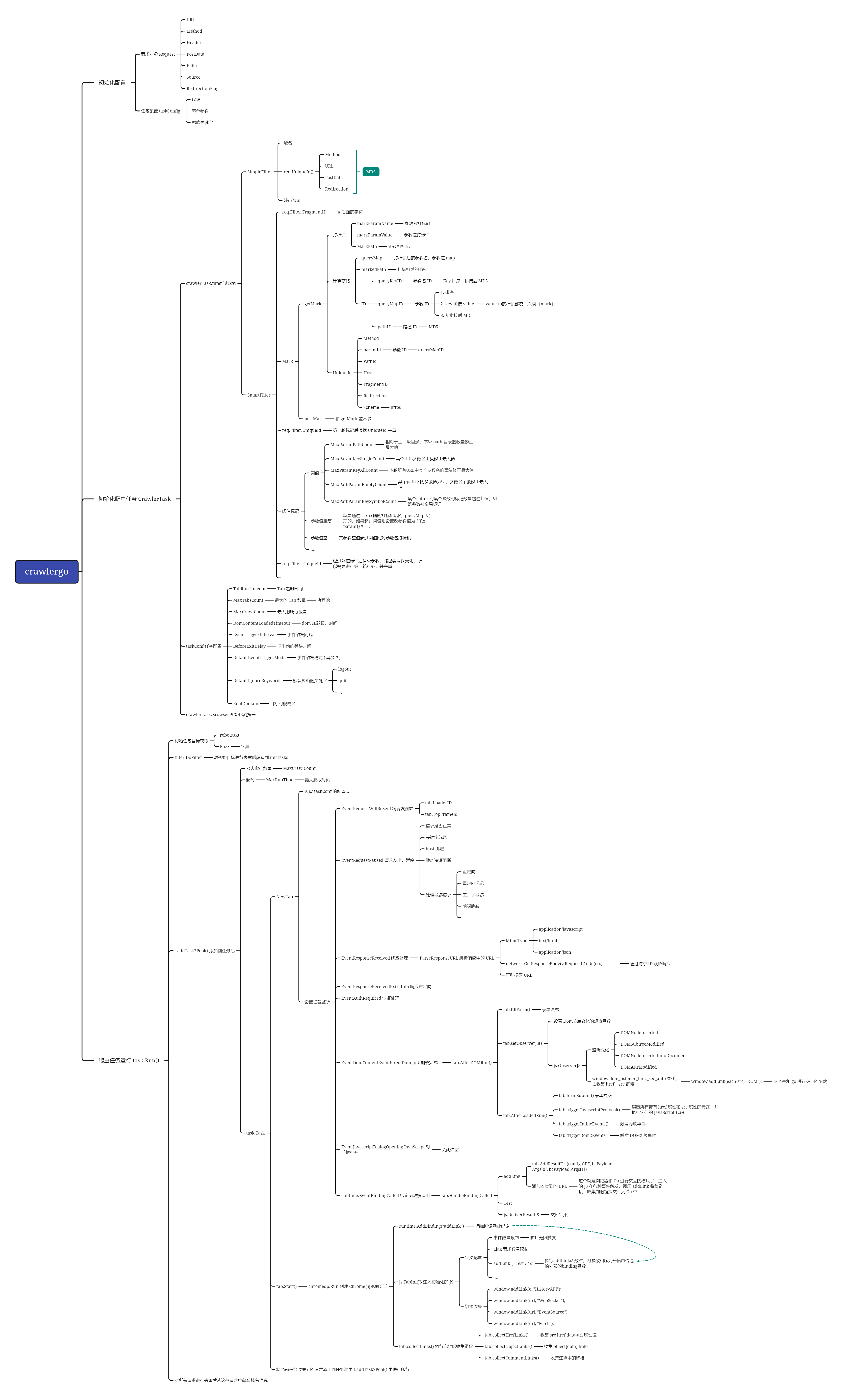
画了一下导图:

crawlergo

源码学习

跟着 crawlergo 的流程走一遍,具体的逻辑在 pkg/task_main.go 的 Run():

  1. 通过 robots.txt 获取
  2. 通过 Fuzz 目录获取
  3. 收集到的 url 进行过滤后添加到 initTasks 中
  4. 开始对 initTasks 中的目标进行爬行 addTask2Pool
  5. 对所有请求进行去重处理
  6. 从去重后的请求中收集子域名 host
func (t *CrawlerTask) Run() {
    defer t.Pool.Release()  // 释放协程池
    defer t.Browser.Close() // 关闭浏览器

    t.Start = time.Now()
    // 从 robots.txt 中获取 
    if t.Config.PathFromRobots {
        reqsFromRobots := GetPathsFromRobots(*t.Targets[0])
        logger.Logger.Info("get paths from robots.txt: ", len(reqsFromRobots))
        // 获取的的目标添加到 Targets 中
        t.Targets = append(t.Targets, reqsFromRobots...)
    }
    // 通过 Fuzz 获取 
    if t.Config.FuzzDictPath != "" {
        if t.Config.PathByFuzz {
            logger.Logger.Warn("`--fuzz-path` is ignored, using `--fuzz-path-dict` instead")
        }
        reqsByFuzz := GetPathsByFuzzDict(*t.Targets[0], t.Config.FuzzDictPath)
        t.Targets = append(t.Targets, reqsByFuzz...)
    } else if t.Config.PathByFuzz {
        reqsByFuzz := GetPathsByFuzz(*t.Targets[0])
        logger.Logger.Info("get paths by fuzzing: ", len(reqsByFuzz))
        t.Targets = append(t.Targets, reqsByFuzz...)
    }

    t.Result.AllReqList = t.Targets[:]

    var initTasks []*model.Request
    // 对请求进行过滤 打标记 计算唯一 ID 通过 SET 存储
    for _, req := range t.Targets {
        if t.filter.DoFilter(req) {
            logger.Logger.Debugf("filter req: " + req.URL.RequestURI())
            continue
        }
        // 没有重复 添加到任务列表
        initTasks = append(initTasks, req)
        t.Result.ReqList = append(t.Result.ReqList, req)
    }
    logger.Logger.Info("filter repeat, target count: ", len(initTasks))
    // 遍历请求队列 开始访问
    for _, req := range initTasks {
        if !engine2.IsIgnoredByKeywordMatch(*req, t.Config.IgnoreKeywords) {
            t.addTask2Pool(req)
        }
    }

    t.taskWG.Wait()

    // 对全部请求进行唯一去重
    todoFilterAll := make([]*model.Request, len(t.Result.AllReqList))
    copy(todoFilterAll, t.Result.AllReqList)

    t.Result.AllReqList = []*model.Request{}
    var simpleFilter filter2.SimpleFilter
    for _, req := range todoFilterAll {
        if !simpleFilter.UniqueFilter(req) {
            t.Result.AllReqList = append(t.Result.AllReqList, req)
        }
    }

    // 全部域名
    t.Result.AllDomainList = AllDomainCollect(t.Result.AllReqList)
    // 子域名
    t.Result.SubDomainList = SubDomainCollect(t.Result.AllReqList, t.RootDomain)
}

robots.txt 获取:

func GetPathsFromRobots(navReq model2.Request) []*model2.Request {
    logger.Logger.Info("starting to get paths from robots.txt.")
    var result []*model2.Request
    // 通过正则找到 Disallow: 这种格式后面的路径
    var urlFindRegex = regexp.MustCompile(`(?:Disallow|Allow):.*?(/.+)`)
    var urlRegex = regexp.MustCompile(`(/.+)`)

    navReq.URL.Path = "/"
    url := navReq.URL.NoQueryUrl() + "robots.txt"

    resp, err := requests.Get(url, tools.ConvertHeaders(navReq.Headers),
        &requests.ReqOptions{AllowRedirect: false,
            Timeout: 5,
            Proxy:   navReq.Proxy})
    if err != nil {
        //for
        //logger.Logger.Error("request to robots.txt error ", err)
        return result
    }

    if resp.StatusCode < 200 || resp.StatusCode >= 300 {
        return result
    }
    urlList := urlFindRegex.FindAllString(resp.Text, -1)
    // 生成 req
    for _, _url := range urlList {
        _url = strings.TrimSpace(_url)
        _url = urlRegex.FindString(_url)
        url, err := model2.GetUrl(_url, *navReq.URL)
        if err != nil {
            continue
        }
        req := model2.GetRequest(config.GET, url)
        req.Source = config.FromRobots
        result = append(result, &req)
    }
    return result
}

Fuzz:

func doFuzz(navReq model2.Request, pathList []string) []*model2.Request {
    validateUrl = mapset.NewSet()
    var result []*model2.Request
    pool, _ := ants.NewPool(20)
    defer pool.Release()
    for _, path := range pathList {
        path = strings.TrimPrefix(path, "/")
        path = strings.TrimSuffix(path, "\n")
        task := singleFuzz{
            navReq: navReq,
            path:   path,
        }
        pathFuzzWG.Add(1)
        go func() {
            // 发起请求
            err := pool.Submit(task.doRequest)
            if err != nil {
                pathFuzzWG.Done()
            }
        }()
    }

    pathFuzzWG.Wait()
    // 对 URL 进行处理 生成 req
    for _, _url := range validateUrl.ToSlice() {
        _url := _url.(string)
        url, err := model2.GetUrl(_url)
        if err != nil {
            continue
        }
        req := model2.GetRequest(config.GET, url)
        req.Source = config.FromFuzz
        result = append(result, &req)
    }
    return result
}

/**

 */
func (s singleFuzz) doRequest() {
    defer pathFuzzWG.Done()

    url := fmt.Sprintf(`%s://%s/%s`, s.navReq.URL.Scheme, s.navReq.URL.Host, s.path)
    resp, errs := requests.Get(url, tools.ConvertHeaders(s.navReq.Headers),
        &requests.ReqOptions{Timeout: 2, AllowRedirect: false, Proxy: s.navReq.Proxy})
    if errs != nil {
        return
    }
    // 将存活的 URL 放到 validateUrl Set 中
    if resp.StatusCode >= 200 && resp.StatusCode < 300 {
        validateUrl.Add(url)
    } else if resp.StatusCode == 301 {
        locations := resp.Header["Location"]
        if len(locations) == 0 {
            return
        }
        location := locations[0]
        redirectUrl, err := model2.GetUrl(location)
        if err != nil {
            return
        }
        if redirectUrl.Host == s.navReq.URL.Host {
            validateUrl.Add(url)
        }
    }
}

DoFilter 这里会先对初始收集到的 url 进行一个过滤,看一下过滤:

这里有两个:

  1. simple_filter
  2. smart_filter

simple_filter:

1
2
3
4
5
6
7
8
9
func NewSimpleFilter(host string) *SimpleFilter {
    staticSuffixSet := config.StaticSuffixSet.Clone()

    for _, suffix := range []string{"js", "css", "json"} {
        staticSuffixSet.Add(suffix)
    }
    s := &SimpleFilter{UniqueSet: mapset.NewSet(), staticSuffixSet: staticSuffixSet, HostLimit: host}
    return s
}
  1. 域名限制 => 限制爬取的域名
  2. Unique 去重
  3. 静态资源
func (s *SimpleFilter) DoFilter(req *model.Request) bool {
    if s.UniqueSet == nil {
        s.UniqueSet = mapset.NewSet()
    }
    // 过滤域名
    if s.HostLimit != "" && s.DomainFilter(req) {
        return true
    }
    // Unique 去重
    if s.UniqueFilter(req) {
        return true
    }
    // 过滤静态资源
    if s.StaticFilter(req) {
        return true
    }
    return false
}

这里的 Unique 是使用的 req.UniqueId() :

func (s *SimpleFilter) UniqueFilter(req *model.Request) bool {
    if s.UniqueSet == nil {
        s.UniqueSet = mapset.NewSet()
    }
    if s.UniqueSet.Contains(req.UniqueId()) {
        return true
    } else {
        s.UniqueSet.Add(req.UniqueId())
        return false
    }
}

看一下这个 UniqueId 是怎么生成的:

这里是根据请求方法 + URL + Post数据进行 MD5 获取的 UinqueId 值。

func (req *Request) UniqueId() string {
    if req.RedirectionFlag {
        return tools.StrMd5(req.NoHeaderId() + "Redirection")
    } else {
        return req.NoHeaderId()
    }
}

func (req *Request) NoHeaderId() string {
    return tools.StrMd5(req.Method + req.URL.String() + req.PostData)
}

静态资源过滤:

func (s *SimpleFilter) StaticFilter(req *model.Request) bool {
    if s.UniqueSet == nil {
        s.UniqueSet = mapset.NewSet()
    }
    // 首先将slice转换成map

    if req.URL.FileExt() == "" {
        return false
    }
    // 后缀是 "js", "css", "json" 就过滤 ?
    if s.staticSuffixSet.Contains(req.URL.FileExt()) {
        return true
    }
    return false
}

这里不太明白 JS 为什么要过滤,虽然动态爬虫是去模拟浏览器触发请求,但是 JS 里面也有可能存在一些路径或者敏感信息。

在看一下这个 smart_filter 过滤模式:

func (s *SmartFilter) DoFilter(req *model.Request) bool {
    // 首先过滤掉静态资源、基础的去重、过滤其它的域名
    if s.SimpleFilter.DoFilter(req) {
        logger.Logger.Debugf("filter req by simplefilter: " + req.URL.RequestURI())
        return true
    }
    // 计算 Fragment ID
    req.Filter.FragmentID = s.calcFragmentID(req.URL.Fragment)
    // 标记
    if req.Method == config.GET || req.Method == config.DELETE || req.Method == config.HEAD || req.Method == config.OPTIONS {
        s.getMark(req)
        s.repeatCountStatistic(req)
    } else if req.Method == config.POST || req.Method == config.PUT {
        s.postMark(req)
    } else {
        logger.Logger.Debug("dont support such method: " + req.Method)
    }
    // 对标记后的请求进行去重
    uniqueId := req.Filter.UniqueId
    if s.uniqueMarkedIds.Contains(uniqueId) {
        logger.Logger.Debugf("filter req by uniqueMarkedIds 1: " + req.URL.RequestURI())
        return true
    }
    // 全局数值型参数标记
    s.globalFilterLocationMark(req)
    // 接下来对标记的 GET 请求进行去重
    if req.Method == config.GET || req.Method == config.DELETE || req.Method == config.HEAD || req.Method == config.OPTIONS {
        // 对超过阈值的GET请求进行标记
        s.overCountMark(req)
        // 重新计算 QueryMapId
        req.Filter.QueryMapId = getParamMapID(req.Filter.MarkedQueryMap)
        // 重新计算 PathId
        req.Filter.PathId = getPathID(req.Filter.MarkedPath)
    } else {
        // 重新计算 PostDataId
        req.Filter.PostDataId = getParamMapID(req.Filter.MarkedPostDataMap)
    }
    // 重新计算请求唯一ID
    req.Filter.UniqueId = getMarkedUniqueID(req)
    // 新的ID再次去重
    newUniqueId := req.Filter.UniqueId
    if s.uniqueMarkedIds.Contains(newUniqueId) {
        logger.Logger.Debugf("filter req by uniqueMarkedIds 2: " + req.URL.RequestURI())
        return true
    }
    // 添加到结果集中
    s.uniqueMarkedIds.Add(newUniqueId)
    return false
}
  1. 使用 simple_filter 简单过滤
  2. 计算 Fragment 的 ID
  3. 对请求进行打标记
  4. 通过标记后的 ID 进行去重
  5. 接下来对标记的 GET 请求进行去重

calcFragmentID:

fragment 就是 # 后面的字符串:
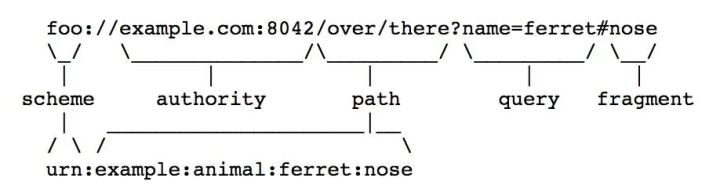
// calcFragmentID 计算 fragment 唯一值,如果 fragment 的格式为 url path
func (s *SmartFilter) calcFragmentID(fragment string) string {
    if fragment == "" || !strings.HasPrefix(fragment, "/") {
        return ""
    }
    // 拼接获取 fragment 的 url
    fakeUrl, err := model.GetUrl(fragment)
    if err != nil {
        logger.Logger.Error("cannot calculate url fragment: ", err)
        return ""
    }
    // 对 fragment url 打标记 获取 UniqueId
    // XXX: discuss https://github.com/Qianlitp/crawlergo/issues/100
    fakeReq := model.GetRequest(config.GET, fakeUrl)
    s.getMark(&fakeReq)
    // s.repeatCountStatistic(&fakeReq)
    return fakeReq.Filter.UniqueId
}

然后就是看看它是怎么去打标记的:

func (s *SmartFilter) getMark(req *model.Request) {
    // 首先是解码前的预先替换
    todoURL := *(req.URL)
    todoURL.RawQuery = s.preQueryMark(todoURL.RawQuery)

    // 将参数部分转换为 map
    queryMap := todoURL.QueryMap()
    // 对参数名打标记 数字和 long 标记
    queryMap = markParamName(queryMap)
    // 对参数值打标记 => map[paramName]标记
    queryMap = s.markParamValue(queryMap, *req)
    markedPath := MarkPath(todoURL.Path)

    // 计算唯一的ID
    var queryKeyID string
    var queryMapID string
    // 参数名和参数的 ID
    if len(queryMap) != 0 {
        queryKeyID = getKeysID(queryMap)
        queryMapID = getParamMapID(queryMap)
    } else {
        queryKeyID = ""
        queryMapID = ""
    }
    pathID := getPathID(markedPath)

    req.Filter.MarkedQueryMap = queryMap
    req.Filter.QueryKeysId = queryKeyID
    req.Filter.QueryMapId = queryMapID
    req.Filter.MarkedPath = markedPath  // 存储打标记后的路径
    req.Filter.PathId = pathID

    // 最后计算标记后的唯一请求ID
    req.Filter.UniqueId = getMarkedUniqueID(req)
}

preQueryMark 对原始的请求参数进行预先标记,这里的标记就是通过正则替换:

1
2
3
var chineseRegex = regexp.MustCompile("[\u4e00-\u9fa5]+")
var urlencodeRegex = regexp.MustCompile("(?:%[A-Fa-f0-9]{2,6})+")
var unicodeRegex = regexp.MustCompile(`(?:\\u\w{4})+`)
// Query 的 Map 对象会自动解码,所以对 RawQuery 进行预先的标记 
func (s *SmartFilter) preQueryMark(rawQuery string) string {
    if chineseRegex.MatchString(rawQuery) {
        // 中文正则的地方替换为 {{chinese}} 其他同理 这个就是打标记
        return chineseRegex.ReplaceAllString(rawQuery, ChineseMark) 
    } else if urlencodeRegex.MatchString(rawQuery) {
        return urlencodeRegex.ReplaceAllString(rawQuery, UrlEncodeMark)
    } else if unicodeRegex.MatchString(rawQuery) {
        return unicodeRegex.ReplaceAllString(rawQuery, UnicodeMark)
    }
    return rawQuery
}

将请求参数转换为 map:

func (u *URL) QueryMap() map[string]interface{} {
    queryMap := map[string]interface{}{}
    for key, value := range u.Query() {
       if len(value) == 1 {
          queryMap[key] = value[0]
       } else {
          queryMap[key] = value
       }
    }
    return queryMap
}

返回对 map 中的 key 也就是参数名打标记,参数名的标记仅标记过长和纯数字的:

func markParamName(paramMap map[string]interface{}) map[string]interface{} {
    markedParamMap := map[string]interface{}{}
    for key, value := range paramMap {
        // 纯字母不处理
        if onlyAlphaRegex.MatchString(key) {
            markedParamMap[key] = value
            // 参数名过长
        } else if len(key) >= 32 {
            markedParamMap[TooLongMark] = value
            // 替换掉数字
        } else {
            key = replaceNumRegex.ReplaceAllString(key, NumberMark)
            markedParamMap[key] = value
        }
    }
    return markedParamMap
}

然后是参数值的标记,参数值是可变的所以就肯定是都标记的,这里的标记就是去初始化一个 map 存储 map[参数名]标记值 这样,其他的也是通过正则去进行标记替换,包含的很多模式,非字符类型,字符类型的大小写混合这种,考虑的很全:

func (s *SmartFilter) markParamValue(paramMap map[string]interface{}, req model.Request) map[string]interface{} {
    markedParamMap := map[string]interface{}{}
    for key, value := range paramMap {
        // 先处理 bool list number 类型的标记
        switch value.(type) {
        case bool:
            markedParamMap[key] = BoolMark
            continue
        case types.Slice:
            markedParamMap[key] = ListMark
            continue
        case float64:
            markedParamMap[key] = NumberMark
            continue
        }
        // 然后就是对 string 类型的处理
        valueStr, ok := value.(string)
        if !ok {
            continue
        }
        // Crawlergo 为特定字符,说明此参数位置为数值型,非逻辑型,记录下此参数,全局过滤
        if strings.Contains(valueStr, "Crawlergo") {
            name := req.URL.Hostname() + req.URL.Path + req.Method + key
            s.filterLocationSet.Add(name)
            markedParamMap[key] = CustomValueMark
            // 全大写字母
        } else if onlyAlphaUpperRegex.MatchString(valueStr) {
            markedParamMap[key] = UpperMark
            // 参数值长度大于等于16
        } else if len(valueStr) >= 16 {
            markedParamMap[key] = TooLongMark
            // 均为数字和一些符号组成
        } else if onlyNumberRegex.MatchString(valueStr) || onlyNumberRegex.MatchString(numSymbolRegex.ReplaceAllString(valueStr, "")) {
            markedParamMap[key] = NumberMark
            // 存在中文
        } else if chineseRegex.MatchString(valueStr) {
            markedParamMap[key] = ChineseMark
            // urlencode
        } else if urlencodeRegex.MatchString(valueStr) {
            markedParamMap[key] = UrlEncodeMark
            // unicode
        } else if unicodeRegex.MatchString(valueStr) {
            markedParamMap[key] = UnicodeMark
            // 时间
        } else if onlyNumberRegex.MatchString(timeSymbolRegex.ReplaceAllString(valueStr, "")) {
            markedParamMap[key] = TimeMark
            // 字母加数字
        } else if onlyAlphaNumRegex.MatchString(valueStr) && numberRegex.MatchString(valueStr) {
            markedParamMap[key] = MixAlphaNumMark
            // 含有一些特殊符号
        } else if hasSpecialSymbol(valueStr) {
            markedParamMap[key] = MixSymbolMark
            // 数字出现的次数超过3,视为数值型参数
        } else if b := OneNumberRegex.ReplaceAllString(valueStr, "0"); strings.Count(b, "0") >= 3 {
            markedParamMap[key] = MixNumMark
            // 严格模式
        } else if s.StrictMode {
            // 无小写字母
            if !alphaLowerRegex.MatchString(valueStr) {
                markedParamMap[key] = NoLowerAlphaMark
                // 常见的值一般为 大写字母、小写字母、数字、下划线的任意组合,组合类型超过三种则视为伪静态
            } else {
                count := 0
                if alphaLowerRegex.MatchString(valueStr) {
                    count += 1
                }
                if alphaUpperRegex.MatchString(valueStr) {
                    count += 1
                }
                if numberRegex.MatchString(valueStr) {
                    count += 1
                }
                if strings.Contains(valueStr, "_") || strings.Contains(valueStr, "-") {
                    count += 1
                }
                if count >= 3 {
                    markedParamMap[key] = MixStringMark
                }
            }
        } else {
            // 其他情况就是不打了
            markedParamMap[key] = value
        }
    }
    return markedParamMap
}

之后是去做路径标记,路径标记就直接把匹配到的路径替换为空,然后再设置为标记位:

func MarkPath(path string) string {
    pathParts := strings.Split(path, "/")
    for index, part := range pathParts {
        if len(part) >= 32 {
            pathParts[index] = TooLongMark
        } else if onlyNumberRegex.MatchString(numSymbolRegex.ReplaceAllString(part, "")) {
            pathParts[index] = NumberMark
            // html 类型
        } else if strings.HasSuffix(part, ".html") || strings.HasSuffix(part, ".htm") || strings.HasSuffix(part, ".shtml") {
            // 替换到 .html 这种后缀
            part = htmlReplaceRegex.ReplaceAllString(part, "")
            // 大写、小写、数字混合
            if numberRegex.MatchString(part) && alphaUpperRegex.MatchString(part) && alphaLowerRegex.MatchString(part) {
                pathParts[index] = MixAlphaNumMark
                // 纯数字
            } else if b := numSymbolRegex.ReplaceAllString(part, ""); onlyNumberRegex.MatchString(b) {
                pathParts[index] = NumberMark
            }
            // 含有特殊符号
        } else if hasSpecialSymbol(part) {
            pathParts[index] = MixSymbolMark
        } else if chineseRegex.MatchString(part) {
            pathParts[index] = ChineseMark
        } else if unicodeRegex.MatchString(part) {
            pathParts[index] = UnicodeMark
        } else if onlyAlphaUpperRegex.MatchString(part) {
            pathParts[index] = UpperMark
            // 均为数字和一些符号组成 先去掉一些符号 - _ 这些 然后看是否为纯数字 可能是针对如 /2024-01-02/ 这种 blog 类型的
        } else if b := numSymbolRegex.ReplaceAllString(part, ""); onlyNumberRegex.MatchString(b) {
            pathParts[index] = NumberMark
            // 数字出现的次数超过3,视为伪静态path 
        } else if b := OneNumberRegex.ReplaceAllString(part, "0"); strings.Count(b, "0") > 3 {
            pathParts[index] = MixNumMark
        }
    }
    newPath := strings.Join(pathParts, "/")
    return newPath
}

返回是去生成参数名和参数部分的 ID:

参数名这里就是拼接然后 md5:

func getKeysID(dataMap map[string]interface{}) string {
    var keys []string
    var idStr string
    for key := range dataMap {
        keys = append(keys, key)
    }
    sort.Strings(keys)
    for _, key := range keys {
        idStr += key
    }
    return tools.StrMd5(idStr)
}

参数这里:

func getParamMapID(dataMap map[string]interface{}) string {
    var keys []string
    var idStr string
    var markReplaceRegex = regexp.MustCompile(`{{.+}}`)
    for key := range dataMap {
        keys = append(keys, key)
    }
    sort.Strings(keys)
    for _, key := range keys {
        value := dataMap[key]
        idStr += key
        if value, ok := value.(string); ok {
            // 把参数值打过标记的部分替换成 {{mark}} 拼接后进行 MD5
            idStr += markReplaceRegex.ReplaceAllString(value, "{{mark}}")
        }
    }
    return tools.StrMd5(idStr)
}

计算 Path ID 直接 MD5 :

1
2
3
func getPathID(path string) string {
    return tools.StrMd5(path)
}

然后赋值到 Filter 中:

1
2
3
4
5
req.Filter.MarkedQueryMap = queryMap
req.Filter.QueryKeysId = queryKeyID
req.Filter.QueryMapId = queryMapID
req.Filter.MarkedPath = markedPath
req.Filter.PathId = pathID

通过请求方法、参数ID、路径ID、Host、FragmentID、协议等组合起来 md5 后作为请求的 uniqueStr

func getMarkedUniqueID(req *model.Request) string {
    var paramId string
    if req.Method == config.GET || req.Method == config.DELETE || req.Method == config.HEAD || req.Method == config.OPTIONS {
        paramId = req.Filter.QueryMapId
    } else {
        paramId = req.Filter.PostDataId
    }

    uniqueStr := req.Method + paramId + req.Filter.PathId + req.URL.Host + req.Filter.FragmentID
    if req.RedirectionFlag {
        uniqueStr += "Redirection"
    }
    if req.URL.Path == "/" && req.URL.RawQuery == "" && req.URL.Scheme == "https" {
        uniqueStr += "https"
    }

    return tools.StrMd5(uniqueStr)
}

GET 、HEAD 等类型的请求还会做一个重复参数标记,这个其实就是去记录请求参数ID的数量,还有请求ID+参数名[参数值] 的数量

/*
*
进行全局重复参数名、参数值、路径的统计标记
之后对超过阈值的部分再次打标记
*/
func (s *SmartFilter) repeatCountStatistic(req *model.Request) {
    queryKeyId := req.Filter.QueryKeysId
    pathId := req.Filter.PathId
    if queryKeyId != "" {
        // 所有参数名重复数量统计 => 存储 queryKeyId 和数量
        if v, ok := s.filterParamKeyRepeatCount.Load(queryKeyId); ok {
            s.filterParamKeyRepeatCount.Store(queryKeyId, v.(int)+1)
        } else {
            s.filterParamKeyRepeatCount.Store(queryKeyId, 1)
        }

        for key, value := range req.Filter.MarkedQueryMap {
            // 某个URL的所有参数名重复数量统计 参数 key id + 该 key
            paramQueryKey := queryKeyId + key

            if set, ok := s.filterParamKeySingleValues.Load(paramQueryKey); ok {
                set := set.(mapset.Set)
                set.Add(value)
            } else {
                s.filterParamKeySingleValues.Store(paramQueryKey, mapset.NewSet(value))
            }

            //本轮所有URL中某个参数重复数量统计
            if _, ok := s.filterParamKeyAllValues.Load(key); !ok {
                s.filterParamKeyAllValues.Store(key, mapset.NewSet(value))
            } else {
                if v, ok := s.filterParamKeyAllValues.Load(key); ok {
                    set := v.(mapset.Set)
                    if !set.Contains(value) {
                        set.Add(value)
                    }
                }
            }

            // 如果参数值为空,统计该PATH下的空值参数名个数
            if value == "" {
                if _, ok := s.filterPathParamEmptyValues.Load(pathId); !ok {
                    s.filterPathParamEmptyValues.Store(pathId, mapset.NewSet(key))
                } else {
                    if v, ok := s.filterPathParamEmptyValues.Load(pathId); ok {
                        set := v.(mapset.Set)
                        if !set.Contains(key) {
                            set.Add(key)
                        }
                    }
                }
            }

            pathIdKey := pathId + key
            // 某path下的参数值去重标记出现次数统计
            if v, ok := s.filterPathParamKeySymbol.Load(pathIdKey); ok {
                if markedStringRegex.MatchString(value.(string)) {
                    s.filterPathParamKeySymbol.Store(pathIdKey, v.(int)+1)
                }
            } else {
                s.filterPathParamKeySymbol.Store(pathIdKey, 1)
            }

        }
    }

    // 相对于上一级目录,本级path目录的数量统计,存在文件后缀的情况下,放行常见脚本后缀
    if req.URL.ParentPath() == "" || inCommonScriptSuffix(req.URL.FileExt()) {
        return
    }

    //
    parentPathId := tools.StrMd5(req.URL.ParentPath())
    currentPath := strings.Replace(req.Filter.MarkedPath, req.URL.ParentPath(), "", -1)
    if _, ok := s.filterParentPathValues.Load(parentPathId); !ok {
        s.filterParentPathValues.Store(parentPathId, mapset.NewSet(currentPath))
    } else {
        if v, ok := s.filterParentPathValues.Load(parentPathId); ok {
            set := v.(mapset.Set)
            if !set.Contains(currentPath) {
                set.Add(currentPath)
            }
        }
    }
}

Post 类型的也进行打标记和 Get 的类型:

image-20240327111535900

打完标记后会根据 req.Filter.UniqueId 进行去重

// 全局数值型参数标记
s.globalFilterLocationMark(req)

// 接下来对标记的 GET 请求进行去重
if req.Method == config.GET || req.Method == config.DELETE || req.Method == config.HEAD || req.Method == config.OPTIONS {
    // 对超过阈值的GET请求进行标记
    s.overCountMark(req)

    // 重新计算 QueryMapId
    req.Filter.QueryMapId = getParamMapID(req.Filter.MarkedQueryMap)
    // 重新计算 PathId
    req.Filter.PathId = getPathID(req.Filter.MarkedPath)
} else {
    // 重新计算 PostDataId
    req.Filter.PostDataId = getParamMapID(req.Filter.MarkedPostDataMap)
}

overCountMark 这里就是对参数、路径部分超过最大阈值的去打一个最大标记

func (s *SmartFilter) overCountMark(req *model.Request) {
    queryKeyId := req.Filter.QueryKeysId
    pathId := req.Filter.PathId
    // 参数不为空,
    if req.Filter.QueryKeysId != "" {
        // 某个URL的所有参数名重复数量超过阈值 且该参数有超过三个不同的值 则打标记
        if v, ok := s.filterParamKeyRepeatCount.Load(queryKeyId); ok && v.(int) > MaxParamKeySingleCount {
            for key := range req.Filter.MarkedQueryMap {
                paramQueryKey := queryKeyId + key
                if set, ok := s.filterParamKeySingleValues.Load(paramQueryKey); ok {
                    set := set.(mapset.Set)
                    // 3 个打标记 {{fix_param}}
                    if set.Cardinality() > 3 {
                        req.Filter.MarkedQueryMap[key] = FixParamRepeatMark
                    }
                }
            }
        }

        for key := range req.Filter.MarkedQueryMap {
            // 所有URL中,某个参数不同的值出现次数超过阈值,打标记去重
            if paramKeySet, ok := s.filterParamKeyAllValues.Load(key); ok {
                paramKeySet := paramKeySet.(mapset.Set)
                if paramKeySet.Cardinality() > MaxParamKeyAllCount {
                    req.Filter.MarkedQueryMap[key] = FixParamRepeatMark
                }
            }

            pathIdKey := pathId + key
            // 某个PATH的GET参数值去重标记出现次数超过阈值,则对该PATH的该参数进行全局标记
            if v, ok := s.filterPathParamKeySymbol.Load(pathIdKey); ok && v.(int) > MaxPathParamKeySymbolCount {
                req.Filter.MarkedQueryMap[key] = FixParamRepeatMark
            }
        }

        // 处理某个path下空参数值的参数个数超过阈值 如伪静态: http://bang.360.cn/?chu_xiu
        if v, ok := s.filterPathParamEmptyValues.Load(pathId); ok {
            set := v.(mapset.Set)
            if set.Cardinality() > MaxPathParamEmptyCount {
                newMarkerQueryMap := map[string]interface{}{}
                for key, value := range req.Filter.MarkedQueryMap {
                    if value == "" {
                        newMarkerQueryMap[FixParamRepeatMark] = ""
                    } else {
                        newMarkerQueryMap[key] = value
                    }
                }
                req.Filter.MarkedQueryMap = newMarkerQueryMap
            }
        }
    }

    // 处理本级 path 的伪静态
    if req.URL.ParentPath() == "" || inCommonScriptSuffix(req.URL.FileExt()) {
        return
    }
    parentPathId := tools.StrMd5(req.URL.ParentPath())
    if set, ok := s.filterParentPathValues.Load(parentPathId); ok {
        set := set.(mapset.Set)
        if set.Cardinality() > MaxParentPathCount {
            if strings.HasSuffix(req.URL.ParentPath(), "/") {
                req.Filter.MarkedPath = req.URL.ParentPath() + FixPathMark
            } else {
                req.Filter.MarkedPath = req.URL.ParentPath() + "/" + FixPathMark
            }
        }
    }
}

处理过超过阈值的部分后会再进行一次打标记,这个时候路径、参数会经过改变,所以会进行再一轮打标记:

// 接下来对标记的 GET 请求进行去重
if req.Method == config.GET || req.Method == config.DELETE || req.Method == config.HEAD || req.Method == config.OPTIONS {
    // 对超过阈值的GET请求进行标记
    s.overCountMark(req)

    // 重新计算 QueryMapId
    req.Filter.QueryMapId = getParamMapID(req.Filter.MarkedQueryMap)
    // 重新计算 PathId
    req.Filter.PathId = getPathID(req.Filter.MarkedPath)
} else {
    // 重新计算 PostDataId
    req.Filter.PostDataId = getParamMapID(req.Filter.MarkedPostDataMap)
}

// 重新计算请求唯一ID
req.Filter.UniqueId = getMarkedUniqueID(req)

然后就是使用新的标记 ID 进行去重处理了:

req.Filter.UniqueId = getMarkedUniqueID(req)

// 新的ID再次去重
newUniqueId := req.Filter.UniqueId
if s.uniqueMarkedIds.Contains(newUniqueId) {
    logger.Logger.Debugf("filter req by uniqueMarkedIds 2: " + req.URL.RequestURI())
    return true
}

// 添加到结果集中
s.uniqueMarkedIds.Add(newUniqueId)
return false

到这里 crawlergo 的去重部分就完了,它是通过对参数进行打标记进行的去重处理:

简单一下就是这样:

1
2
3
http://url/abc?id=1
http://url/abc?id=2
http://url/abc?id=3

这些会被打标机为:

http://url/abc?id={{number}}

这样就做到了去重。

过滤之后,会把请求添加到 initTasks 列表中,然后就开始爬行任务了:

1
2
3
4
5
for _, req := range initTasks {
    if !engine2.IsIgnoredByKeywordMatch(*req, t.Config.IgnoreKeywords) {
        t.addTask2Pool(req)
    }
}

IsIgnoredByKeywordMatch 用来判断该请求是否是需要忽略掉的:

1
2
3
4
5
6
7
8
9
func IsIgnoredByKeywordMatch(req model2.Request, IgnoreKeywords []string) bool {
    for _, _str := range IgnoreKeywords {
        if strings.Contains(req.URL.String(), _str) {
            logger.Logger.Info("ignore request: ", req.SimpleFormat())
            return true
        }
    }
    return false
}

然后就是爬行部分:

func (t *CrawlerTask) addTask2Pool(req *model.Request) {
    t.taskCountLock.Lock()
    // 爬行数量
    if t.crawledCount >= t.Config.MaxCrawlCount {
        t.taskCountLock.Unlock()
        return
    } else {
        t.crawledCount += 1
    }
    // 超时
    if t.Start.Add(time.Second * time.Duration(t.Config.MaxRunTime)).Before(time.Now()) {
        t.taskCountLock.Unlock()
        return
    }
    t.taskCountLock.Unlock()

    t.taskWG.Add(1)
    // 根据请求生成协程任务
    task := t.generateTabTask(req)
    go func() {
        // 这里使用了 ants 去控制协程 执行的是 task.Task() 去做爬行的具体逻辑
        err := t.Pool.Submit(task.Task)
        if err != nil {
            t.taskWG.Done()
            logger.Logger.Error("addTask2Pool ", err)
        }
    }()
}

generateTabTask 就是封装了一下这个请求:

1
2
3
4
5
6
7
8
func (t *CrawlerTask) generateTabTask(req *model.Request) *tabTask {
    task := tabTask{
        crawlerTask: t,
        browser:     t.Browser,
        req:         req,
    }
    return &task
}

具体的爬行任务就是在 Task() 这里了:

func (t *tabTask) Task() {
    defer t.crawlerTask.taskWG.Done()

    // 设置tab超时时间,若设置了程序最大运行时间, tab超时时间和程序剩余时间取小
    timeremaining := t.crawlerTask.Start.Add(time.Duration(t.crawlerTask.Config.MaxRunTime) * time.Second).Sub(time.Now())
    tabTime := t.crawlerTask.Config.TabRunTimeout
    if t.crawlerTask.Config.TabRunTimeout > timeremaining {
        tabTime = timeremaining
    }

    if tabTime <= 0 {
        return
    }
    // 创建一个标签页
    tab := engine2.NewTab(t.browser, *t.req, engine2.TabConfig{
        TabRunTimeout:           tabTime,
        DomContentLoadedTimeout: t.crawlerTask.Config.DomContentLoadedTimeout,
        EventTriggerMode:        t.crawlerTask.Config.EventTriggerMode,
        EventTriggerInterval:    t.crawlerTask.Config.EventTriggerInterval,
        BeforeExitDelay:         t.crawlerTask.Config.BeforeExitDelay,
        EncodeURLWithCharset:    t.crawlerTask.Config.EncodeURLWithCharset,
        IgnoreKeywords:          t.crawlerTask.Config.IgnoreKeywords,
        CustomFormValues:        t.crawlerTask.Config.CustomFormValues,
        CustomFormKeywordValues: t.crawlerTask.Config.CustomFormKeywordValues,
    })
    // 开始爬行
    tab.Start()

    // 收集结果
    t.crawlerTask.Result.resultLock.Lock()
    t.crawlerTask.Result.AllReqList = append(t.crawlerTask.Result.AllReqList, tab.ResultList...)
    t.crawlerTask.Result.resultLock.Unlock()
    // 遍历收集到的结构 添加任务
    for _, req := range tab.ResultList {
        if !t.crawlerTask.filter.DoFilter(req) {
            t.crawlerTask.Result.resultLock.Lock()
            t.crawlerTask.Result.ReqList = append(t.crawlerTask.Result.ReqList, req)
            t.crawlerTask.Result.resultLock.Unlock()
            if !engine2.IsIgnoredByKeywordMatch(*req, t.crawlerTask.Config.IgnoreKeywords) {
                t.crawlerTask.addTask2Pool(req)
            }
        }
    }
}

在 NewTab 这里主要是设置请求拦截:

  1. js 、json 类型的使用 ParseResponseURL 收集页面中可能存在的 url
  2. 重定向处理
  3. 认证页面阻塞处理
  4. 表单填充
  5. JS 注入
  6. 回调处理
func NewTab(browser *Browser, navigateReq model2.Request, config TabConfig) *Tab {
    var tab Tab
    tab.ExtraHeaders = map[string]interface{}{}
    var DOMContentLoadedRun = false
    tab.Ctx, tab.Cancel = browser.NewTab(config.TabRunTimeout)
    for key, value := range browser.ExtraHeaders {
        navigateReq.Headers[key] = value
        if key != "Host" {
            tab.ExtraHeaders[key] = value
        }
    }
    tab.NavigateReq = navigateReq
    tab.config = config
    tab.DocBodyNodeId = 0

    // 设置请求拦截监听
    chromedp.ListenTarget(*tab.Ctx, func(v interface{}) {
        switch v := v.(type) {
        // 根据不同的事件 选择执行对应的动作
        case *network.EventRequestWillBeSent:
            if string(v.RequestID) == string(v.LoaderID) && v.Type == "Document" && tab.TopFrameId == "" {
                tab.LoaderID = string(v.LoaderID)
                tab.TopFrameId = string(v.FrameID)
            }

        // 请求发出时暂停 即 请求拦截
        case *fetch.EventRequestPaused:
            tab.WG.Add(1)
            go tab.InterceptRequest(v)

        // 解析所有JS文件中的URL并添加到结果中
        // 解析HTML文档中的URL
        // 查找当前页面的编码
        case *network.EventResponseReceived:
            if v.Response.MimeType == "application/javascript" || v.Response.MimeType == "text/html" || v.Response.MimeType == "application/json" {
                tab.WG.Add(1)
                go tab.ParseResponseURL(v)
            }
            if v.RequestID.String() == tab.NavNetworkID {
                tab.WG.Add(1)
                go tab.GetContentCharset(v)
            }
        // 处理后端重定向 3XX
        case *network.EventResponseReceivedExtraInfo:
            if v.RequestID.String() == tab.NavNetworkID {
                tab.WG.Add(1)
                go tab.HandleRedirectionResp(v)
            }
        //case *network.EventLoadingFailed:
        //  logger.Logger.Error("EventLoadingFailed ", v.ErrorText)
        // 401 407 要求认证 此时会阻塞当前页面 需要处理解决
        case *fetch.EventAuthRequired:
            tab.WG.Add(1)
            go tab.HandleAuthRequired(v)

        // DOMContentLoaded
        // 开始执行表单填充 和 执行DOM节点观察函数
        // 只执行一次
        case *page.EventDomContentEventFired: // 当 DOM 内容加载完成时触发的事件
            if DOMContentLoadedRun {
                return
            }
            DOMContentLoadedRun = true
            tab.WG.Add(1)
            go tab.AfterDOMRun()
        // Loaded
        case *page.EventLoadEventFired: // 当页面完全加载完成时触发的事件
            if DOMContentLoadedRun {
                return
            }
            DOMContentLoadedRun = true
            tab.WG.Add(1)
            go tab.AfterDOMRun()

        // 关闭弹窗
        case *page.EventJavascriptDialogOpening: // 当页面弹出 JavaScript 对话框时触发的事件
            tab.WG.Add(1)
            go tab.dismissDialog()

        // handle expose function
        case *runtime.EventBindingCalled: // 当页面中的绑定函数被调用时触发的事件
            tab.WG.Add(1)
            go tab.HandleBindingCalled(v)
        }
    })

    return &tab
}

这里主要看一下 URL 收集的部分:

ParseResponseURL 通过正则去从页面响应中去提取 URL:

func (tab *Tab) ParseResponseURL(v *network.EventResponseReceived) {
    // 通过请求 ID 获取响应内容
    defer tab.WG.Done()
    ctx := tab.GetExecutor()
    res, err := network.GetResponseBody(v.RequestID).Do(ctx)
    if err != nil {
        logger.Logger.Debug("ParseResponseURL ", err)
        return
    }
    resStr := string(res)
    // 这里测试 https://identity-dev.schibsted.com/api/status 发现 json 响应中的路径被转义了
    //resStr = strings.ReplaceAll(resStr, "\\/", "/") // json 类型的数据 string 后会 \/ 导致正则无法匹配
    urlRegex := regexp.MustCompile(`(?s)` + config.SuspectURLRegex)
    urlList := urlRegex.FindAllString(resStr, -1)
    for _, url := range urlList {
        // 去除首尾字符 => 可以优化
        url = url[1 : len(url)-1]
        url_lower := strings.ToLower(url)
        if strings.HasPrefix(url_lower, "image/x-icon") || strings.HasPrefix(url_lower, "text/css") || strings.HasPrefix(url_lower, "text/javascript") {
            continue
        }
        // 输出 => 添加到结果 url
        tab.AddResultUrl(config.GET, url, config.FromJSFile)
    }
}

然后看下它这里注入的 JS 操作:

func (tab *Tab) AfterDOMRun() {
    defer tab.WG.Done()

    logger.Logger.Debug("afterDOMRun start")
    if !tab.getBodyNodeId() {
        logger.Logger.Debug("no body document NodeID, exit.")
        return
    }

    tab.domWG.Add(2)
    go tab.fillForm() // 表单填充
    go tab.setObserverJS()
    tab.domWG.Wait()
    logger.Logger.Debug("afterDOMRun end")
    tab.WG.Add(1)
    go tab.AfterLoadedRun()
}

表单填充 tab.fillForm() :

func (tab *Tab) fillForm() {
    defer tab.domWG.Done()
    logger.Logger.Debug("fillForm start")
    tab.fillFormWG.Add(3)
    f := FillForm{
        tab: tab,
    }
    go f.fillInput()    // input 标签
    go f.fillMultiSelect()  // 多选框
    go f.fillTextarea() // 文本框

    tab.fillFormWG.Wait()
    logger.Logger.Debug("fillForm end")
}

看一下是怎么去实现填充的:

func (f *FillForm) fillInput() {
    defer f.tab.fillFormWG.Done()
    var nodes []*cdp.Node
    ctx := f.tab.GetExecutor()

    tCtx, cancel := context.WithTimeout(ctx, time.Second*2)
    defer cancel()
    // 首先判断input标签是否存在,减少等待时间 提前退出
    inputNodes, inputErr := f.tab.GetNodeIDs(`input`)
    if inputErr != nil || len(inputNodes) == 0 {
        logger.Logger.Debug("fillInput: get form input element err")
        if inputErr != nil {
            logger.Logger.Debug(inputErr)
        }
        return
    }
    // 获取所有的input标签
    err := chromedp.Nodes(`input`, &nodes, chromedp.ByQueryAll).Do(tCtx)

    if err != nil {
        logger.Logger.Debug("get all input element err")
        logger.Logger.Debug(err)
        return
    }

    // 找出 type 为空 或者 type=text
    for _, node := range nodes {
        // 兜底超时
        tCtxN, cancelN := context.WithTimeout(ctx, time.Second*5)
        attrType := node.AttributeValue("type")
        if attrType == "text" || attrType == "" {
            inputName := node.AttributeValue("id") + node.AttributeValue("class") + node.AttributeValue("name")
            value := f.GetMatchInputText(inputName)
            var nodeIds = []cdp.NodeID{node.NodeID}
            // 先使用模拟输入
            _ = chromedp.SendKeys(nodeIds, value, chromedp.ByNodeID).Do(tCtxN)
            // 再直接赋值JS属性
            _ = chromedp.SetAttributeValue(nodeIds, "value", value, chromedp.ByNodeID).Do(tCtxN)
        } else if attrType == "email" || attrType == "password" || attrType == "tel" {
            value := f.GetMatchInputText(attrType)
            var nodeIds = []cdp.NodeID{node.NodeID}
            // 先使用模拟输入
            _ = chromedp.SendKeys(nodeIds, value, chromedp.ByNodeID).Do(tCtxN)
            // 再直接赋值JS属性
            _ = chromedp.SetAttributeValue(nodeIds, "value", value, chromedp.ByNodeID).Do(tCtxN)
        } else if attrType == "radio" || attrType == "checkbox" {
            var nodeIds = []cdp.NodeID{node.NodeID}
            _ = chromedp.SetAttributeValue(nodeIds, "checked", "true", chromedp.ByNodeID).Do(tCtxN)
        } else if attrType == "file" || attrType == "image" {
            var nodeIds = []cdp.NodeID{node.NodeID}
            wd, _ := os.Getwd()
            filePath := wd + "/upload/image.png"
            _ = chromedp.RemoveAttribute(nodeIds, "accept", chromedp.ByNodeID).Do(tCtxN)
            _ = chromedp.RemoveAttribute(nodeIds, "required", chromedp.ByNodeID).Do(tCtxN)
            _ = chromedp.SendKeys(nodeIds, filePath, chromedp.ByNodeID).Do(tCtxN)
        }
        cancelN()
    }
}

获取到 input 之后再去判断需要填充的类型,根据类型选择不同的文本去填充:
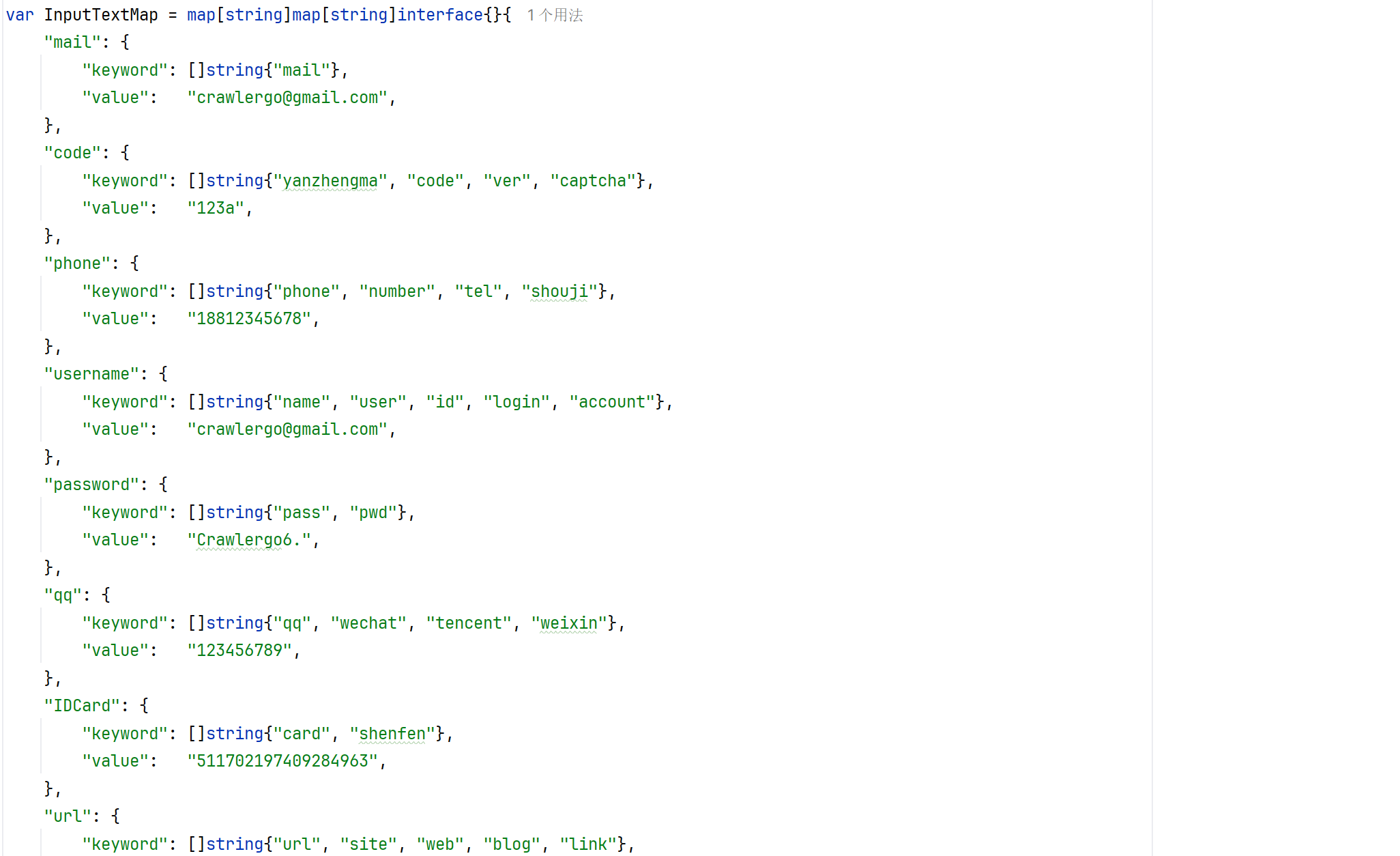
image-20240327161550750

对于单选框,文件上传也做了对应的处理。

之后去注入 JS 去检测 Dom 变化:

1
2
3
4
5
6
7
func (tab *Tab) setObserverJS() {
    defer tab.domWG.Done()
    logger.Logger.Debug("setObserverJS start")
    // 设置 Dom 节点变化的观察函数
    go tab.Evaluate(js.ObserverJS)
    logger.Logger.Debug("setObserverJS end")
}

JS 如下:

function init_observer_sec_auto_b() {
    window.dom_listener_func_sec_auto = function (e) {
        let node = e.target;
        // 收集 src 
        let nodeListSrc = node.querySelectorAll("[src]");
        for (let each of nodeListSrc) {
            if (each.src) {
                // 这里的 addLink 也是自定义的 就是去收集链接的
                window.addLink(each.src, "DOM");
                let attrValue = each.getAttribute("src");
                // 如果是 javascript: 就执行后面的代码
                if (attrValue.toLocaleLowerCase().startsWith("javascript:")) {
                    try {
                        eval(attrValue.substring(11));
                    }
                    catch {}
                }
            }
        }
        // 收集 href
        let nodeListHref = node.querySelectorAll("[href]");
        nodeListHref = window.randArr(nodeListHref);
        for (let each of nodeListHref) {
            if (each.href) {
                window.addLink(each.href, "DOM");
                let attrValue = each.getAttribute("href");
                if (attrValue.toLocaleLowerCase().startsWith("javascript:")) {
                    try {
                        eval(attrValue.substring(11));
                    }
                    catch {}
                }
            }
        }
    };
    // 监测 dom 节点的变化 触发 window.dom_listener_func_sec_auto 也就是上面收集 src 和 href 的函数
    document.addEventListener('DOMNodeInserted', window.dom_listener_func_sec_auto, true);
    document.addEventListener('DOMSubtreeModified', window.dom_listener_func_sec_auto, true);
    document.addEventListener('DOMNodeInsertedIntoDocument', window.dom_listener_func_sec_auto, true);
    document.addEventListener('DOMAttrModified', window.dom_listener_func_sec_auto, true);
})()

表单填充完毕、Dom 检测 JS 注入之后,它会去调用 AfterLoadedRun 去触发页面的动作,触发动作是通过 JS 去完成的:

func (tab *Tab) AfterLoadedRun() {
    defer tab.WG.Done()
    logger.Logger.Debug("afterLoadedRun start")
    tab.formSubmitWG.Add(2)
    tab.loadedWG.Add(3)
    tab.removeLis.Add(1)

    go tab.formSubmit() // 表单提交
    tab.formSubmitWG.Wait()
    logger.Logger.Debug("formSubmit end")
    // 异步
    if tab.config.EventTriggerMode == config.EventTriggerAsync {
        go tab.triggerJavascriptProtocol()
        go tab.triggerInlineEvents()
        go tab.triggerDom2Events()
        tab.loadedWG.Wait()
        // 同步 按照一定的顺序
    } else if tab.config.EventTriggerMode == config.EventTriggerSync {
        tab.triggerInlineEvents()
        time.Sleep(tab.config.EventTriggerInterval)
        tab.triggerDom2Events()
        time.Sleep(tab.config.EventTriggerInterval)
        tab.triggerJavascriptProtocol()
    }

    // 事件触发之后 需要等待一点时间让浏览器成功发出 ajax 请求 更新 DOM
    time.Sleep(tab.config.BeforeExitDelay)

    go tab.RemoveDOMListener()
    tab.removeLis.Wait()
    logger.Logger.Debug("afterLoadedRun end")
}

看一下用于触发动作的 JS 代码:

triggerJavascriptProtocol:

(async function click_all_a_tag_javascript(){
    // 获取 href 节点列表
    let nodeListHref = document.querySelectorAll("[href]");
    // 随机排列
    nodeListHref = window.randArr(nodeListHref);
    for (let node of nodeListHref) {
        // 获取属性值 如果是 javascript: 就会去执行后面的 JS 代码
        let attrValue = node.getAttribute("href");
        if (attrValue.toLocaleLowerCase().startsWith("javascript: ")) {
            await window.sleep(%f);
            try {
                eval(attrValue.substring(11));
            }
            catch {}
        }
    }
    // src 同理
    let nodeListSrc = document.querySelectorAll("[src]");
    nodeListSrc = window.randArr(nodeListSrc);
    for (let node of nodeListSrc) {
        let attrValue = node.getAttribute("src");
        if (attrValue.toLocaleLowerCase().startsWith("javascript:")) {
            await window.sleep(%f);
            try {
                eval(attrValue.substring(11));
            }
            catch {}
        }
    }
})()

内联事件:triggerInlineEvents

(async function trigger_all_inline_event(){
    // 一些内联事件名称
    let eventNames = ["onabort", "onblur", "onchange", "onclick", "ondblclick", "onerror", "onfocus", "onkeydown", "onkeypress", "onkeyup", "onload", "onmousedown", "onmousemove", "onmouseout", "onmouseover", "onmouseup", "onreset", "onresize", "onselect", "onsubmit", "onunload"];
    for (let eventName of eventNames) {
        let event = eventName.replace("on", "");
        let nodeList = document.querySelectorAll("[" + eventName + "]");
        if (nodeList.length > 100) {
            nodeList = nodeList.slice(0, 100);
        }
        nodeList = window.randArr(nodeList);
        for (let node of nodeList) {
            await window.sleep(%f);
            // 触发事件
            let evt = document.createEvent('CustomEvent');
            evt.initCustomEvent(event, false, true, null);
            try {
                node.dispatchEvent(evt);
            }
            catch {}
        }
    }
})()

触发 DOM2 级事件 triggerDom2Events :

// 定义一个立即执行的异步函数
(async function trigger_all_dom2_custom_event() {
    // 定义一个函数,用于向下传递事件到子节点
    function transmit_child(node, event, loop) {
        let _loop = loop + 1 // 递归深度增加
        if (_loop > 4) {
            return; // 如果递归深度超过4,则停止递归
        }
        if (node.nodeType === 1) { // 确保节点是一个元素节点
            if (node.hasChildNodes) {
                // 随机选择一个子节点并尝试触发事件
                let index = parseInt(Math.random()*node.children.length,10);
                try {
                    node.children[index].dispatchEvent(event);
                } catch(e) {}
                // 对最多5个子节点(或所有子节点如果少于5个)递归执行相同操作
                let max = node.children.length>5?5:node.children.length;
                for (let count=0;count<max;count++) {
                    let index = parseInt(Math.random()*node.children.length,10);
                    transmit_child(node.children[index], event, _loop);
                }
            }
        }
    }

    // 选择所有带有特定标记(sec_auto_dom2_event_flag)的节点
    let nodes = document.querySelectorAll("[sec_auto_dom2_event_flag]");
    if (nodes.length > 200) {
        // 如果选中的节点超过200,只取前200个
        nodes = nodes.slice(0, 200);
    }

    // 假设randArr是一个自定义函数,用于打乱数组顺序
    nodes = window.randArr(nodes);

    for (let node of nodes) {
        let loop = 0;
        // 等待一段时间,%f需要替换为实际的等待时间(毫秒)
        await window.sleep(%f);

        // 从节点获取要触发的事件名称列表,并使用Set去重
        let event_name_list = node.getAttribute("sec_auto_dom2_event_flag").split("|");
        let event_name_set = new Set(event_name_list);
        event_name_list = [...event_name_set];

        // 遍历所有事件名称
        for (let event_name of event_name_list) {
            // 创建并初始化自定义事件
            let evt = document.createEvent('CustomEvent');
            evt.initCustomEvent(event_name, true, true, null);

            // 对特定事件,递归地向子节点传递
            if (event_name == "click" || event_name == "focus" || event_name == "mouseover" || event_name == "select") {
                transmit_child(node, evt, loop);
            }

            // 如果节点的class或id包含"close",则跳过此节点
            if ((node.className && node.className.includes("close")) || (node.id && node.id.includes("close"))) {
                continue;
            }

            // 尝试在节点上触发事件
            try {
                node.dispatchEvent(evt);
            } catch(e) {}
        }
    }
})() // 立即执行函数

事件触发完毕后等待,之后会移除掉监听:

1
2
3
4
5
6
(function remove_dom_listener() {
    document.removeEventListener('DOMNodeInserted', window.dom_listener_func_sec_auto, true);
    document.removeEventListener('DOMSubtreeModified', window.dom_listener_func_sec_auto, true);
    document.removeEventListener('DOMNodeInsertedIntoDocument', window.dom_listener_func_sec_auto, true);
    document.removeEventListener('DOMAttrModified', window.dom_listener_func_sec_auto, true);
})()

然后是 tab.HandleBindingCalled 这里去进行绑定函数的处理,这里的绑定是 Start() 中 runtime.AddBinding 绑定的函数,其中的 addLink 在 JS 中用的很多,就是各种情况操作都使用它去做链接收集,那就看下这里是如果实现的:

func (tab *Tab) HandleBindingCalled(event *runtime.EventBindingCalled) {
    defer tab.WG.Done()
    payload := []byte(event.Payload)
    var bcPayload bindingCallPayload
    _ = json.Unmarshal(payload, &bcPayload)
    // 对于 addLink 获取它的 url 然后添加到 ResultUrl 中 => JS 和 Go 进行交互 
    if bcPayload.Name == "addLink" && len(bcPayload.Args) > 1 {
        tab.AddResultUrl(config.GET, bcPayload.Args[0], bcPayload.Args[1])
    }
    if bcPayload.Name == "Test" {
        fmt.Println(bcPayload.Args)
    }
    tab.Evaluate(fmt.Sprintf(js.DeliverResultJS, bcPayload.Name, bcPayload.Seq, "s"))
}

标签页创建完成之后就使用 Start() 开始爬行:

func (tab *Tab) Start() {
    logger.Logger.Info("Crawling " + tab.NavigateReq.Method + " " + tab.NavigateReq.URL.String())
    defer tab.Cancel()
    if err := chromedp.Run(*tab.Ctx,
        RunWithTimeOut(tab.Ctx, tab.config.DomContentLoadedTimeout, chromedp.Tasks{
            //
            runtime.Enable(),
            // 开启网络层API
            network.Enable(),
            // 开启请求拦截API
            fetch.Enable().WithHandleAuthRequests(true),
            // 添加回调函数绑定
            // XSS-Scan 使用的回调
            runtime.AddBinding("addLink"),
            runtime.AddBinding("Test"),
            // 初始化执行JS
            chromedp.ActionFunc(func(ctx context.Context) error {
                var err error
                // 页面加载时执行JS代码
                _, err = page.AddScriptToEvaluateOnNewDocument(js.TabInitJS).Do(ctx)
                if err != nil {
                    return err
                }
                return nil
            }),
            network.SetExtraHTTPHeaders(tab.ExtraHeaders),
            // 执行导航
            chromedp.Navigate(tab.NavigateReq.URL.String()),
        }),
    ); err != nil {
        if errors.Is(err, context.Canceled) {
            logger.Logger.Debug("Crawling Canceled")
            return
        }
        logger.Logger.Warn("navigate timeout ", tab.NavigateReq.URL.String())
    }

    waitDone := func() <-chan struct{} {
        tab.WG.Wait()
        ch := make(chan struct{})
        defer close(ch)
        return ch
    }

    select {
    case <-waitDone():
        logger.Logger.Debug("all navigation tasks done.")
    case <-time.After(tab.config.DomContentLoadedTimeout + time.Second*10):
        logger.Logger.Warn("navigation tasks TIMEOUT.")
    }

    // 等待收集所有链接
    logger.Logger.Debug("collectLinks start.")
    tab.collectLinkWG.Add(3)
    go tab.collectLinks()
    tab.collectLinkWG.Wait()
    logger.Logger.Debug("collectLinks end.")

    // 识别页面编码 并编码所有 URL
    if tab.config.EncodeURLWithCharset {
        tab.DetectCharset()
        tab.EncodeAllURLWithCharset()
    }

    //fmt.Println(tab.NavigateReq.URL.String(), len(tab.ResultList))
    //for _, v := range tab.ResultList {
    //  v.SimplePrint()
    //}
    // fmt.Println("Finished " + tab.NavigateReq.Method + " " + tab.NavigateReq.URL.String())
}

它先去绑定了 addLink、Test 作用如下,主要是用于 go 和浏览器 JS 交互,这里的作用其实就是通过这种方式去收集链接,在 上面的 init_observer_sec_auto_b 和下面的 addTabInitScript 函数中都可以看到链接收集的操作。

image-20240328141653434

然后在加载页面时注入 js.TabInitJS ,该 JS 处理了初始化和各种场景的链接收集操作:

涉及的一些 JS 知识:

  • window.navigator.webdriver:用于检测当前页面是否在使用自动化测试工具
  • navigator.plugins:返回浏览器的插件列表
  • navigator.permissions:提供了对浏览器权限状态的查询和更改的功能
  • Histor:接口允许操作浏览器的曾经在标签页或者框架里访问的会话历史记录
  • window.history.pushState:向浏览器的历史记录栈中添加一条新的记录,并在不刷新页面的情况下改变URL。这个方法常用于单页面应用程序(SPA)中,可以帮助开发者实现前端路由和用户界面的状态管理
  • window.history.replaceState:更改浏览器地址栏中显示的URL,而无需加载新的页面或重新加载现有页面。这对于在Web应用程序中实现单页应用程序(SPA)非常有用,因为可以更改URL并在不刷新整个页面的情况下更新应用程序的状态。
  • hash 属性:一个可读可写的字符串,该字符串是 URL 的锚部分,一般有当前页面中 href 中 # 地址触发。hash 即 URL 中 # 字符后面的部分。可以通过 window.location.hash 属性获取和设置 hash 值。window.location.hash 值的变化会直接反应到浏览器地址栏(#后面的部分会发生变化),同时,浏览器地址栏 hash 值的变化也会触发 window.location.hash 值的变化,从而触发 onhashchange 事件。当 URL 的片段标识符更改时,将触发 hashchange 事件。Vue 这种前端框架就是 #/path 的
  • window.EventSource:创建一个新的 EventSource,用于从指定的 URL 接收服务器发送事件,可以选择开启凭据模式。这是服务器向浏览器推送信息除过 websocket 的另一种方式 。
  • window.fetch:是浏览器提供的用于发起网络请求的API。它是一种现代的替代传统XHR(XMLHttpRequest)的方式,提供了更简洁和强大的请求和响应处理能力。
  • window.open:是JavaScript中的一个方法,用于在浏览器中打开一个新窗口或标签页,并加载指定的URL。
  • window.setInterval:定时调用的函数,可按照指定的周期(以毫秒计)来调用函数或计算表达式。
(function addTabInitScript () {

    // 移除 window.navigator.webdriver
    Object.defineProperty(navigator, 'webdriver', {
        get: () => false,
    });

    // 绕过浏览器插件数量测试
    // 开发者可能会检测浏览器中已安装的插件数量,以此作为一种安全检测机制或用于浏览器指纹识别。
    Object.defineProperty(navigator, 'plugins', {
        get: () => [1, 2, 3, 4, 5],
    });

    // 用于通过 Chrome 测试
    // 网站开发者可能会检测浏览器是否为Chrome浏览器,并根据检测结果提供不同的行为。
    window.chrome = {
        runtime: {},
    };

    // 修改浏览器权限通知行为
    // 在特定的测试场景或需要检查通知权限的情况下,模拟返回不同的通知权限状态。通过返回自定义的权限状态对象,网页可以根据不同的权限状态来执行相应的逻辑,例如显示不同的提示信息、调整页面行为等。
    const originalQuery = window.navigator.permissions.query;
    window.navigator.permissions.query = (parameters) => (
        parameters.name === 'notifications' ?
            Promise.resolve({ state: Notification.permission }) :
            originalQuery(parameters)
    );

    // 模拟 userAgent
    Object.defineProperty(navigator, 'userAgent', {
        get: () => "Mozilla/5.0 (Windows NT 6.1; Win64; x64) AppleWebKit/537.36 (KHTML, like Gecko) Chrome/79.0.3945.0 Safari/537.36",
    });

    // 修改浏览器对象的属性
    Object.defineProperty(navigator, 'platform', {
        get: function () { return 'win32'; }
    });

    Object.defineProperty(navigator, 'language', {
        get: function () { return 'zh-CN'; }
    });

    Object.defineProperty(navigator, 'languages', {
        get: function () { return ["zh-CN", "zh"]; }
    });

    // history api hook
    // 重写 pushState replaceState 方法 监听历史记录中的 API 
    // 使用使用 window.addLink  去记录 API 到 HistoryAPI
    window.history.pushState = function(a, b, c) { 
        window.addLink(c, "HistoryAPI");
    }
    window.history.replaceState = function(a, b, c) { 
        window.addLink(c, "HistoryAPI");
    }
    // 可写性和可配置性设置为false,即禁止对这两个方法进行重写或修改。
    Object.defineProperty(window.history,"pushState",{"writable": false, "configurable": false});
    Object.defineProperty(window.history,"replaceState",{"writable": false, "configurable": false});

    // 添加 hashchange 事件监听,监听 hash
    window.addEventListener("hashchange", function() {
        window.addLink(document.location.href, "HashChange");
    });
    // 重写 webSocket 构造方法 记录 websokcet 连接相关信息
    var oldWebSocket = window.WebSocket;
    window.WebSocket = function(url, arg) {
        window.addLink(url, "WebSocket");
        return new oldWebSocket(url, arg);
    }
    // 重写 EventSource 构造方法 记录 EventSource 连接相关信息
    var oldEventSource = window.EventSource;
    window.EventSource = function(url) {
        window.addLink(url, "EventSource");
        return new oldEventSource(url);
    }
    // 记录 fetch 发起请求的 url
    var oldFetch = window.fetch;
    window.fetch = function(url) {
        window.addLink(url, "Fetch");
        return oldFetch(url);
    }

    // 锁定表单重置
    HTMLFormElement.prototype.reset = function() {console.log("cancel reset form")};
    Object.defineProperty(HTMLFormElement.prototype,"reset",{"writable": false, "configurable": false});

    // 监听 DOM2 级事件
    window.add_even_listener_count_sec_auto = {};
    // DOM2 级事件限制函数
    let old_event_handle = Element.prototype.addEventListener;
    Element.prototype.addEventListener = function(event_name, event_func, useCapture) {
        let name = "<" + this.tagName + "> " + this.id + this.name + this.getAttribute("class") + "|" + event_name;
        // console.log(name)
        // 对每个事件设定最大的添加次数,防止无限触发,最大次数为5
        if (!window.add_even_listener_count_sec_auto.hasOwnProperty(name)) {
            window.add_even_listener_count_sec_auto[name] = 1;
        } else if (window.add_even_listener_count_sec_auto[name] == 5) {
            return ;
        } else {
             window.add_even_listener_count_sec_auto[name] += 1;
        }
        if (this.hasAttribute("sec_auto_dom2_event_flag")) {
            let sec_auto_dom2_event_flag = this.getAttribute("sec_auto_dom2_event_flag");
            this.setAttribute("sec_auto_dom2_event_flag", sec_auto_dom2_event_flag + "|" + event_name);
        } else {
            this.setAttribute("sec_auto_dom2_event_flag", event_name);
        }
        old_event_handle.apply(this, arguments);
    };
    // Dom0 级事件限制函数
    function dom0_listener_hook(that, event_name) {
        let name = "<" + that.tagName + "> " + that.id + that.name + that.getAttribute("class") + "|" + event_name;
        // console.log(name);
        // 对每个事件设定最大的添加次数,防止无限触发,最大次数为5
        if (!window.add_even_listener_count_sec_auto.hasOwnProperty(name)) {
            window.add_even_listener_count_sec_auto[name] = 1;
        } else if (window.add_even_listener_count_sec_auto[name] == 5) {
            return ;
        } else {
             window.add_even_listener_count_sec_auto[name] += 1;
        }
        if (that.hasAttribute("sec_auto_dom2_event_flag")) {
            let sec_auto_dom2_event_flag = that.getAttribute("sec_auto_dom2_event_flag");
            that.setAttribute("sec_auto_dom2_event_flag", sec_auto_dom2_event_flag + "|" + event_name);
        } else {
            that.setAttribute("sec_auto_dom2_event_flag", event_name);
        }
    }

    // hook dom0 级事件监听
    Object.defineProperties(HTMLElement.prototype, {
        onclick: {set: function(newValue){onclick = newValue;dom0_listener_hook(this, "click");}},
        onchange: {set: function(newValue){onchange = newValue;dom0_listener_hook(this, "change");}},
        onblur: {set: function(newValue){onblur = newValue;dom0_listener_hook(this, "blur");}},
        ondblclick: {set: function(newValue){ondblclick = newValue;dom0_listener_hook(this, "dbclick");}},
        onfocus: {set: function(newValue){onfocus = newValue;dom0_listener_hook(this, "focus");}},
        onkeydown: {set: function(newValue){onkeydown = newValue;dom0_listener_hook(this, "keydown");}},
        onkeypress: {set: function(newValue){onkeypress = newValue;dom0_listener_hook(this, "keypress");}},
        onkeyup: {set: function(newValue){onkeyup = newValue;dom0_listener_hook(this, "keyup");}},
        onload: {set: function(newValue){onload = newValue;dom0_listener_hook(this, "load");}},
        onmousedown: {set: function(newValue){onmousedown = newValue;dom0_listener_hook(this, "mousedown");}},
        onmousemove: {set: function(newValue){onmousemove = newValue;dom0_listener_hook(this, "mousemove");}},
        onmouseout: {set: function(newValue){onmouseout = newValue;dom0_listener_hook(this, "mouseout");}},
        onmouseover: {set: function(newValue){onmouseover = newValue;dom0_listener_hook(this, "mouseover");}},
        onmouseup: {set: function(newValue){onmouseup = newValue;dom0_listener_hook(this, "mouseup");}},
        onreset: {set: function(newValue){onreset = newValue;dom0_listener_hook(this, "reset");}},
        onresize: {set: function(newValue){onresize = newValue;dom0_listener_hook(this, "resize");}},
        onselect: {set: function(newValue){onselect = newValue;dom0_listener_hook(this, "select");}},
        onsubmit: {set: function(newValue){onsubmit = newValue;dom0_listener_hook(this, "submit");}},
        onunload: {set: function(newValue){onunload = newValue;dom0_listener_hook(this, "unload");}},
        onabort: {set: function(newValue){onabort = newValue;dom0_listener_hook(this, "abort");}},
        onerror: {set: function(newValue){onerror = newValue;dom0_listener_hook(this, "error");}},
    })

    // 监听 window.open 的 url
    window.open = function (url) {
        console.log("trying to open window.");
        window.addLink(url, "OpenWindow");
    }
    Object.defineProperty(window,"open",{"writable": false, "configurable": false});

    // hook window close 不真的关闭页面
    window.close = function() {console.log("trying to close page.");};
    Object.defineProperty(window,"close",{"writable": false, "configurable": false});

    // hook setTimeout
    //window.__originalSetTimeout = window.setTimeout;
    //window.setTimeout = function() {
    //    arguments[1] = 0;
    //    return window.__originalSetTimeout.apply(this, arguments);
    //};
    //Object.defineProperty(window,"setTimeout",{"writable": false, "configurable": false});

    // hook setInterval 时间设置为60秒 目的是减 轻chrome 的压力
    // 限制定时调用函数的的事件为 60 秒
    window.__originalSetInterval = window.setInterval;
    window.setInterval = function() {
        arguments[1] = 60000;
        return window.__originalSetInterval.apply(this, arguments);
    };
    Object.defineProperty(window,"setInterval",{"writable": false, "configurable": false});

    // 劫持原生ajax,并对每个请求设置最大请求次数
    window.ajax_req_count_sec_auto = {};
    XMLHttpRequest.prototype.__originalOpen = XMLHttpRequest.prototype.open;
    XMLHttpRequest.prototype.open = function(method, url, async, user, password) {
        // hook code
        this.url = url;
        this.method = method;
        let name = method + url;
        if (!window.ajax_req_count_sec_auto.hasOwnProperty(name)) {
            window.ajax_req_count_sec_auto[name] = 1
        } else {
            window.ajax_req_count_sec_auto[name] += 1
        }

        if (window.ajax_req_count_sec_auto[name] <= 10) {
            return this.__originalOpen(method, url, true, user, password);
        }
    }
    Object.defineProperty(XMLHttpRequest.prototype,"open",{"writable": false, "configurable": false});

    XMLHttpRequest.prototype.__originalSend = XMLHttpRequest.prototype.send;
    XMLHttpRequest.prototype.send = function(data) {
        // hook code
        let name = this.method + this.url;
        if (window.ajax_req_count_sec_auto[name] <= 10) {
            return this.__originalSend(data);
        }
    }
    Object.defineProperty(XMLHttpRequest.prototype,"send",{"writable": false, "configurable": false});

    XMLHttpRequest.prototype.__originalAbort = XMLHttpRequest.prototype.abort;
    XMLHttpRequest.prototype.abort = function() {
        // hook code
    }
    Object.defineProperty(XMLHttpRequest.prototype,"abort",{"writable": false, "configurable": false});

    // 打乱数组的方法
    window.randArr = function (arr) {
        for (var i = 0; i < arr.length; i++) {
            var iRand = parseInt(arr.length * Math.random());
            var temp = arr[i];
            arr[i] = arr[iRand];
            arr[iRand] = temp;
        }
        return arr;
    }
    // 延迟执行
    window.sleep = function(time) {
        return new Promise((resolve) => setTimeout(resolve, time));
    }

    Array.prototype.indexOf = function(val) {
        for (var i = 0; i < this.length; i++) {
            if (this[i] == val) return i;
        }
        return -1;
    };

    Array.prototype.remove = function(val) {
        var index = this.indexOf(val);
        if (index > -1) {
            this.splice(index, 1);
        }
    };

    const binding = window["addLink"];
    window["addLink"] = async(...args) => {
        // 从 addLink 中获取 callbacks 它是一个 Map()
        const me = window["addLink"];
        let callbacks = me['callbacks'];
        if (!callbacks) {
          callbacks = new Map();
          me['callbacks'] = callbacks;
        }
        // 当前序列号
        const seq = (me['lastSeq'] || 0) + 1;
        me['lastSeq'] = seq;
        const promise = new Promise(fulfill => callbacks.set(seq, fulfill));
        binding(JSON.stringify({name: "addLink", seq, args}));
        return promise;
    };

    const bindingTest = window["Test"];
    window["Test"] = async(...args) => {
        const me = window["Test"];
        let callbacks = me['callbacks'];
        if (!callbacks) {
          callbacks = new Map();
          me['callbacks'] = callbacks;
        }
        const seq = (me['lastSeq'] || 0) + 1;
        me['lastSeq'] = seq;
        const promise = new Promise(fulfill => callbacks.set(seq, fulfill));
        binding(JSON.stringify({name: "Test", seq, args}));
        return promise;
    };
})()

之后是做了一个链接收集的操作,就是收集 src href data-url 属性值、 object[data] 、还有注释中的链接

func (tab *Tab) collectLinks() {
    go tab.collectHrefLinks()
    go tab.collectObjectLinks()
    go tab.collectCommentLinks()
}

func (tab *Tab) collectHrefLinks() {
    defer tab.collectLinkWG.Done()
    ctx := tab.GetExecutor()
    // 收集 src href data-url 属性值
    attrNameList := []string{"src", "href", "data-url", "data-href"}
    for _, attrName := range attrNameList {
        tCtx, cancel := context.WithTimeout(ctx, time.Second*1)
        var attrs []map[string]string
        _ = chromedp.AttributesAll(fmt.Sprintf(`[%s]`, attrName), &attrs, chromedp.ByQueryAll).Do(tCtx)
        cancel()
        for _, attrMap := range attrs {
            tab.AddResultUrl(config.GET, attrMap[attrName], config.FromDOM)
        }
    }
}

func (tab *Tab) collectObjectLinks() {
    defer tab.collectLinkWG.Done()
    ctx := tab.GetExecutor()
    // 收集 object[data] links
    tCtx, cancel := context.WithTimeout(ctx, time.Second*1)
    defer cancel()
    var attrs []map[string]string
    _ = chromedp.AttributesAll(`object[data]`, &attrs, chromedp.ByQueryAll).Do(tCtx)
    for _, attrMap := range attrs {
        tab.AddResultUrl(config.GET, attrMap["data"], config.FromDOM)
    }
}

func (tab *Tab) collectCommentLinks() {
    defer tab.collectLinkWG.Done()
    ctx := tab.GetExecutor()
    // 收集注释中的链接
    var nodes []*cdp.Node
    tCtxComment, cancel := context.WithTimeout(ctx, time.Second*1)
    defer cancel()
    commentErr := chromedp.Nodes(`//comment()`, &nodes, chromedp.BySearch).Do(tCtxComment)
    if commentErr != nil {
        logger.Logger.Debug("get comment nodes err")
        logger.Logger.Debug(commentErr)
        return
    }
    urlRegex := regexp.MustCompile(config.URLRegex)
    for _, node := range nodes {
        content := node.NodeValue
        urlList := urlRegex.FindAllString(content, -1)
        for _, url := range urlList {
            tab.AddResultUrl(config.GET, url, config.FromComment)
        }
    }
}

在 Start() 完成之后,它会去把这些收集到的链接再去爬一遍:

tab.Start()

// 收集结果
t.crawlerTask.Result.resultLock.Lock()
t.crawlerTask.Result.AllReqList = append(t.crawlerTask.Result.AllReqList, tab.ResultList...)
t.crawlerTask.Result.resultLock.Unlock()
// 遍历收集到的结构 添加任务
for _, req := range tab.ResultList {
    if !t.crawlerTask.filter.DoFilter(req) {
        t.crawlerTask.Result.resultLock.Lock()
        t.crawlerTask.Result.ReqList = append(t.crawlerTask.Result.ReqList, req)
        t.crawlerTask.Result.resultLock.Unlock()
        if !engine2.IsIgnoredByKeywordMatch(*req, t.crawlerTask.Config.IgnoreKeywords) {
            t.crawlerTask.addTask2Pool(req)
        }
    }
}

再总体简单理一下流程:

task.Run()

  1. initTasks url 收集
  2. robots.txt
  3. Fuzz
  4. filter.DoFilter 去重
  5. addTask2Pool 开始爬 => task.Task()
  6. tab.Start() => 爬行逻辑
    1. engine2.NewTab => 初始化 Tab 和请求拦截监听
      1. 响应处理 js、json、html 解析响应中的链接
      2. 基础认证页面注释处理
      3. tab.AfterDOMRun()
        1. 表单填充、提交
        2. 注入 ObserverJS 收集 src、href 属性值
        3. 触发事件
    2. 初始化 chromedp.Run
      1. runtime.AddBinding("addLink") => 绑定函数,用于 go 和 js 进行交互去收集链接
      2. 注入 js.TabInitJS 浏览器属性、url 收集( addLink )
  7. tab.ResultList 当前页面收集的链接去重再使用 addTask2Pool 去爬
  8. 所有请求去重
  9. 从请求中收集域名数据

学习总结

学到的比较多,动态爬虫的具体实现、请求去重的方式、crawlergo 库深入使用、js 的一些知识,准备再看一看静态爬虫,看看它是如何去实现的。