官网:https://gitforwindows.org/
镜像:https://registry.npmmirror.com/binary.html?path=git-for-windows/
创建仓库 git init
git init 初始化一个仓库
1 2 3 4 # 初始化当前目录 git init# 初始化指定目录 git init <directory>
git clone
git clone 从现有 Git 仓库中拷贝项目
1 2 3 4 # 克隆repo仓库 git clone <repo># 克隆repo仓库到directory目录 git clone <repo> <directory>
git config
git config 配置 git信息
查看配置信息:
编辑配置信息-打开vim编辑器
1 2 git config -e # 针对当前仓库 git config -e --global # 针对系统上所有仓库
设置提交代码时的用户信息:
1 2 git config --global user.name "弗有冥焉" git config --global user.email fuyoumingyan@gmail.com
SSH 配置 gitee、github 都可以使用 ssh 公钥
ssh 相对于 https 更加方便,github 也更快。
1 2 3 cd ~/.ssh ssh-keygen -t rsa -C "fuyoumingyan@gmail.com" cat id_rsa.pub
然后在 gitee 或者 github 上面添加 SSH 公钥即可。
验证:
1 2 ssh -T git@github .com ssh -T git@gitee .com
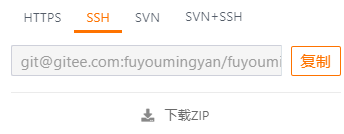
如果使用 ssh 的话,仓库的远程地址就是 git@gitee.com:fuyoumingyan/fuyoumingyan.git 这种的 SSH 地址了。
基本操作
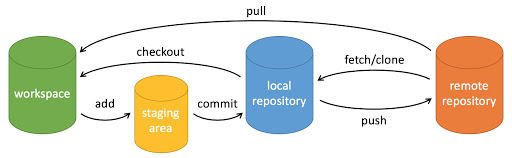
workspace:工作区
staging area:暂存区/缓存区
local repository:版本库或本地仓库
remote repository:远程仓库
本地就是工作区,add 到缓存区,提交到本地仓库后,再push到远程仓库,就是推送到到 github,gitee 这种代码托管平台。
提交到本地仓库
命令
说明
git add
添加文件到暂存区
git status
查看仓库当前的状态,显示有变更的文件。
git diff
比较文件的不同,即暂存区和工作区的差异。
git commit
提交暂存区到本地仓库。
git reset
回退版本。
git rm
将文件从暂存区和工作区中删除。
git mv
移动或重命名工作区文件。
查看仓库当前的状态,显示有变更的文件。
1 2 3 4 5 6 7 8 9 10 $ git status On branch master Your branch is up to date with 'origin/master'.# 未跟踪的文件 Untracked files: (use "git add <file>..." to include in what will be committed) # 8. Corrosion-2/ 文件夹未 add 8. Corrosion-2/ nothing added to commit but untracked files present (use "git add" to track)
add 到暂存区
1 2 3 4 # add 所有文件-实际上还是只 add 未跟踪的文件 git add .# add 指定文件 git add <filename>
1 2 3 4 5 6 7 8 9 10 11 12 13 14 15 16 Administrator@DESKTOP-NURJR6J MINGW64 ~/Desktop/笔记/gitee penetration-test 仓库/靶机渗透 (master)$ git add . Administrator@DESKTOP-NURJR6J MINGW64 ~/Desktop/笔记/gitee penetration-test 仓库/靶机渗透 (master)$ git status On branch master Your branch is up to date with 'origin/master'. Changes to be committed: (use "git restore --staged <file>..." to unstage) new file: 8. Corrosion-2/Corrosion-2.assets/image-20230430104300814.png new file: 8. Corrosion-2/Corrosion-2.assets/image-20230430105426167.png new file: 8. Corrosion-2/Corrosion-2.assets/image-20230430110927971.png new file: 8. Corrosion-2/Corrosion-2.assets/image-20230430111001206.png new file: 8. Corrosion-2/Corrosion-2.assets/image-20230430163907626.png new file: 8. Corrosion-2/Corrosion-2.md
commit 到本地仓库
1 2 3 4 5 6 7 8 9 $ git commit -m '2023-04-30' [master 13108bc] 2023-04-30 6 files changed, 814 insertions(+) create mode 100644 "\351\235\266\346\234\272\346\270\227\351\200\217/8. Corrosion-2/Corrosion-2.assets/image-20230430104300814.png" create mode 100644 "\351\235\266\346\234\272\346\270\227\351\200\217/8. Corrosion-2/Corrosion-2.assets/image-20230430105426167.png" create mode 100644 "\351\235\266\346\234\272\346\270\227\351\200\217/8. Corrosion-2/Corrosion-2.assets/image-20230430110927971.png" create mode 100644 "\351\235\266\346\234\272\346\270\227\351\200\217/8. Corrosion-2/Corrosion-2.assets/image-20230430111001206.png" create mode 100644 "\351\235\266\346\234\272\346\270\227\351\200\217/8. Corrosion-2/Corrosion-2.assets/image-20230430163907626.png" create mode 100644 "\351\235\266\346\234\272\346\270\227\351\200\217/8. Corrosion-2/Corrosion-2.md"
提交到远程仓库
命令
说明
git remote
远程仓库操作
git fetch
从远程获取代码库
git pull
下载远程代码并合并
git push
上传远程代码并合并
添加远程仓库 git remote
1 2 3 4 5 6 7 8 9 10 11 $ git remote add -h usage: git remote add [<options>] <name> <url> 仓库名 仓库链接 -f, --fetch fetch the remote branches --tags import all tags and associated objects when fetching or do not fetch any tag at all (--no-tags) -t, --track <branch> branch(es) to track -m, --master <branch> master branch --mirror[=(push|fetch)] set up remote as a mirror to push to or fetch from
1 $ git remote add gitee https://gitee.com/fuyoumingyan/penetration-test.git
查看远程仓库信息 git remote -v
1 2 3 $ git remote -v gitee https://gitee.com/fuyoumingyan/penetration-test.git (fetch) gitee https://gitee.com/fuyoumingyan/penetration-test.git (push)
推送到远程仓库 git push
1 2 3 4 5 6 7 8 9 10 11 $ git push -u gitee "master" Enumerating objects: 13, done. Counting objects: 100% (13/13), done. Delta compression using up to 4 threads Compressing objects: 100% (11/11), done. Writing objects: 100% (11/11), 189.99 KiB | 12.67 MiB/s, done. Total 11 (delta 2), reused 0 (delta 0), pack-reused 0 remote: Powered by GITEE.COM [GNK-6.4] To https://gitee.com/fuyoumingyan/penetration-test.git 0b32d77..13108bc master -> master branch 'master' set up to track 'gitee/master'.
提交日志
命令
说明
git log
查看历史提交记录
git blame <file>
以列表形式查看指定文件的历史修改记录
1 2 3 4 5 6 7 8 9 10 11 12 13 14 15 16 17 18 19 20 21 22 23 24 25 $ git log commit 13108bc60914d4cf27e2b34c474f918eb00648a2 (HEAD -> master) Author: 弗有冥焉 <fuyoumingyan@gmail.com> Date: Sun Apr 30 18:41:28 2023 +0800 2023-04-30 commit 0b32d77c5862b75b4d3ff179f6ed06801332237a (origin/master) Author: 弗有冥焉 <fuyoumingyan@gmail.com> Date: Sat Apr 29 20:44:00 2023 +0800 2023-04-29 commit 151dcd1252b948e2b060cbcd784ef706f9f5e7a0 Author: 弗有冥焉 <fuyoumingyan@gmail.com> Date: Fri Apr 28 16:20:39 2023 +0800 2023-04-28 commit 28dc9e44df152a057d4deb1755a99237efd4d0f2 Author: 弗有冥焉 <fuyoumingyan@gmail.com> Date: Fri Apr 28 16:11:43 2023 +0800 2023-04-28
忽略文件
.gitignore 文件用来指定有意忽略的未跟踪文件,就是不需要提交到仓库的一些文件
gitignore 语法:
# 用于注释,\ 表示转义,引用 \ 需要加引号 "\"
* 任意字符 0 次或多次,? 任意字符 1 次 ,都不可以匹配 /
/ 在开头表示从 .gitignore 文件所在的目录开始匹配
/ 在末尾表示只匹配目录,否则同名的目录或文件都会被匹配
! 表示不忽略某文件,但如果该文件的父级目录被忽略,则不起效果
[] 匹配字符列表
** 匹配多级目录
恢复文件
没有 add 的文件恢复 - 工作区
add 过但没有 commit - 暂存区
1 git checkout <commit_id> <file>
commit 后恢复到以前的版本 - 本地仓库
1 git checkout <commit_id>
分支管理 开发分支 - 负责开发
主线 - 开发完成后的主要业务线,正常的开发不会影响 - master/main
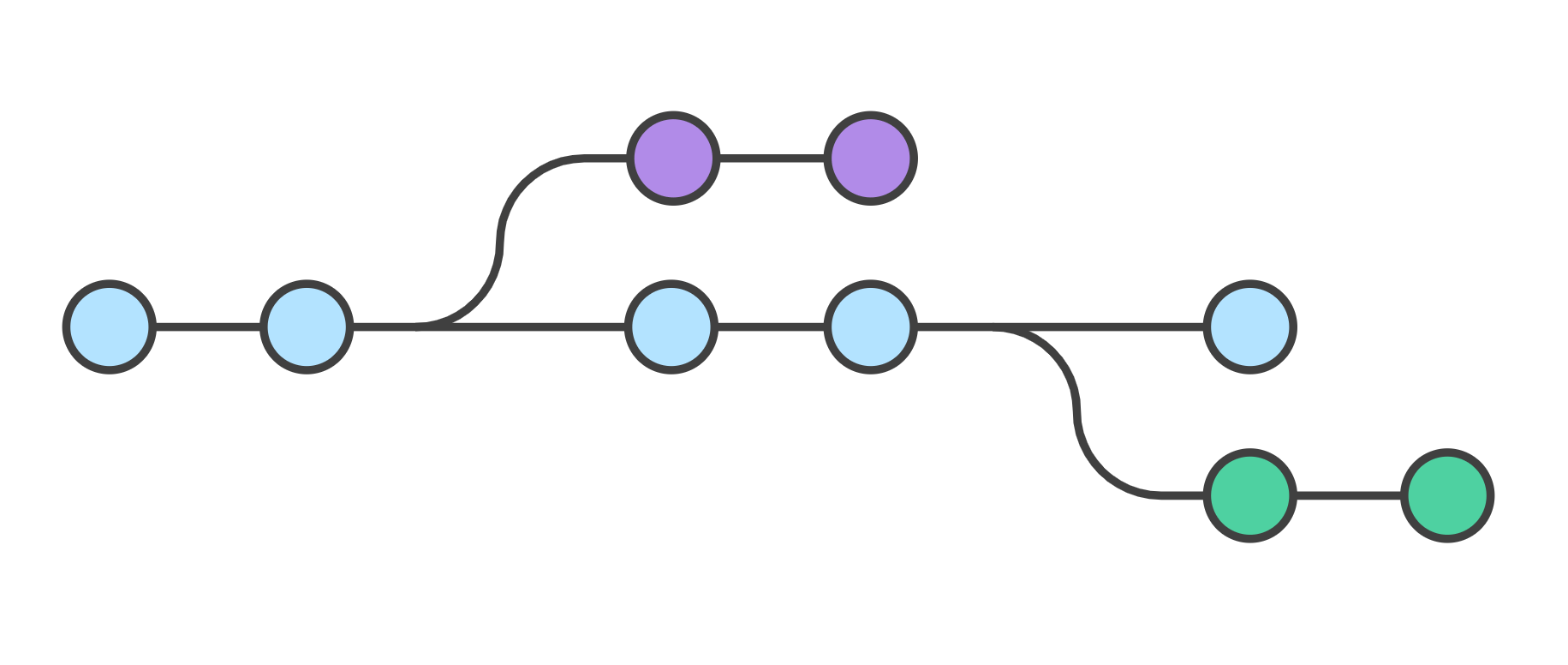
切换分支的时候,Git 会用该分支的最后提交的快照替换你的工作目录的内容, 所以多个分支不需要多个目录。
创建分支
创建仓库时创建分支,默认会创建一个 master 分支
1 git init -b <branchname>
已有仓库
查看分支
1 2 3 $ git branch deve * master
注:创建分支失败或查看分支为空的原因是因为本地还没有创建分支,需要 commit 之后才可以
切换分支
切换分支
创建分支后直接切换到分支
1 git checkout -b <branchname>
删除分支 1 git branch -d <branchname>
重命名分支 1 git branch -m <old-branch> <new-branch>
合并分支 合并的是提交。
切换到那个需要接收改动的分支上。
执行 “git merge” 命令,并且在后面加上那个将要合并进来的分支的名称。
报错解决 1 2 3 4 # 1. 先拉下来合并 git pull origin master# 2. 再上传上去 git push -u origin master